Formattery icon
Formattery icon

Formattery

On-device file converter for iPhone, iPad, and Mac. Convert images, PDFs, and video locally — plus OCR via Vision. No cloud uploads, no account, no subscription. One-time IAP for full unlock; free tier with daily limits.

Batch image conversion

Cost / License

  • Freemium (Pay once)
  • Proprietary

Platforms

  • Mac
  • iPhone
  • iPad
0likes
0comments
0articles

Features

Properties

  1.  Privacy focused

Features

  1.  Live Preview
  2.  Ad-free
  3.  No Tracking
  4.  Batch Editing
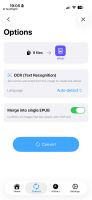
  5.  OCR
  6.  Works Offline
  7.  Dark Mode
  8.  No registration required
  9.  Apple Silicon support
  10.  Video Converter
  11.  No Subscription
  12.  File conversion
  13.  Image Conversion
  14.  Video file conversion

Formattery News & Activities

Highlights All activities

Recent activities

Formattery information

  • Developed by

    ES flagAlvaro Escarcha Esteban
  • Licensing

    Proprietary and Freemium product.
  • Pricing

    One time purchase (perpetual license) ranging between $5 and $6 + free version with limited functionality.
  • Alternatives

    51 alternatives listed
  • Supported Languages

    • English
    • Arabic
    • Chinese
    • French
    • German
    • Hindi
    • Italian
    • Japanese
    • Korean
    • Portuguese
    • Spanish
Formattery was added to AlternativeTo by alEscarcha on and this page was last updated .
No comments or reviews, maybe you want to be first?

What is Formattery?

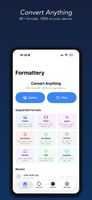
Convert any file — fast, private, and 100% on your device.

Formattery converts images, documents, videos, and audio files instantly without uploading anything to the cloud. Your files never leave your iPhone or iPad.

SUPPORTED FORMATS

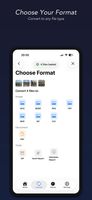
Images: HEIC/HEIF, WebP, SVG, PNG, JPG/JPEG, TIFF/TIF, BMP, GIF, ICO, PSD Camera RAW: DNG, CR2, NEF, ARW, ORF, RW2, RAF Documents: PDF, RTF Office: DOCX, XLSX, PPTX, CSV, ODT, ODP, XLS, Pages, Keynote (experimental) Video: MP4, MOV, MKV, WebM, AVI, FLV, WMV, 3GP, OGV Audio: MP3, M4A, WAV, AAC, AIFF, FLAC, OGG, Opus, WMA, AC3 Ebooks: ePub Subtitle: SRT, VTT, ASS, LRC, SBV, SUB GPS: GPX, KML, KMZ, GeoJSON, TCX 3D Models: STL, OBJ, PLY, DAE, USDZ Markup: Markdown (.md/.markdown), HTML/HTM, Plain Text Archive: ZIP, TAR, GZ/GZIP, 7Z, RAR, CBR, CBZ Tools: File Hash (MD5, SHA-1/256/384/512, CRC32), Metadata Viewer

KEY FEATURES

  • 100% offline — no internet required, no cloud uploads
  • Batch conversion — convert multiple files at once
  • Adjustable quality — fine-tune compression and video resolution
  • Office documents — convert DOCX, XLSX, PPTX and more (experimental)
  • File preview — preview converted files before sharing
  • Source file thumbnails — see what you're converting at a glance
  • Quick Look preview — tap history to preview any converted file
  • Photo library integration — saves to a dedicated Formattery album
  • Conversion history — easily find and share past conversions
  • 3D model conversion — STL, OBJ, PLY, DAE, USDZ
  • ePub ebooks — read and create ePub files
  • Archive formats — ZIP, TAR, GZ, 7Z, RAR extraction
  • Dark mode — beautiful in any lighting

FREE & PRO

Image conversions are completely free. Upgrade once to unlock PDF, video, and audio conversions — no subscriptions, no ads, ever.

PRIVACY FIRST

Every conversion happens entirely on your device. We never collect data, track usage, or upload your files anywhere. What stays on your device is yours alone.

Formattery Videos

Official Links