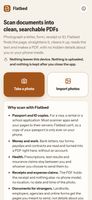
Flatbed is a document scanner that keeps your papers to yourself. Most scanner apps upload your pages to a server to read the text; Flatbed can't. It has no internet permission, reads the text on your phone, and keeps nothing after you close it. It's made for the documents you'd least like to hand to a stranger's server: passport and ID copies, bank letters, contracts, tax forms, payslips and medical results.
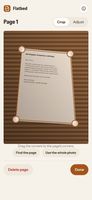
Scanning. Take a photo, import photos, or share them to Flatbed from any app. Flatbed finds the edges of the page automatically (drag a corner with the magnifier if needed), flattens the page as if it had been on a scanner's glass, and levels slightly tilted text.
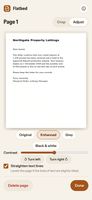
Clean pages. Enhanced mode removes shadows and uneven light and makes the paper white, so a photo taken at the kitchen table looks like a proper scan. Grey and Black & white suit plain text, with a contrast slider and 90° turns.
Searchable PDFs. The text is recognised on your device by Tesseract, built into the app, and added as an invisible layer, so you can search the PDF and copy its text. English, French, Spanish, German and Thai are included, and the text can also be saved as a .txt file. Put several pages in one PDF, in A4, Letter or the shape of what you scanned, or make an image-only PDF with no text layer, for example for an ID copy. Save PDF chooses the place and saves in one step; Share PDF instead sends it straight to another app.
Privacy, in detail:
No permissions at all. No internet, and no camera permission: Take a photo hands over to your phone's own camera app.
No hidden details. Pages are redrawn from the picture alone, so the location, phone model and time in your photos never get in. The PDF has no title, author, app name, dates or document ID, and camera file names that give away the date aren't used.
Only the page is kept: the table, your hands and the room around it are cut away.
Checked before you save. Every PDF goes through the same cleaner as the studio's metadata app Unmarked: "Checked: no hidden data in the PDF."
Pages are held in memory only and are gone when you close the app. No account, no ads, no tracking.
Where it runs. Android 7.0 and later, as a small APK from GitHub releases, with updates through Obtainium or the app's own "Check for updates". It also runs in any modern browser on a phone, tablet or computer, with the same privacy.
Good to know. Clear printed text reads well; handwriting isn't recognised. Check important figures before relying on them.
Free and open source under GPL-3.0. Not on Google Play: the studio supports Keep Android Open and publishes directly instead.









 AnonacondaCodeLab added Flatbed as alternative to CamScan, CamScanner, Adobe Scan, OSS Document Scanner and 2 more


No comments or reviews, maybe you want to be first?