





FireAlpaca
91 likes
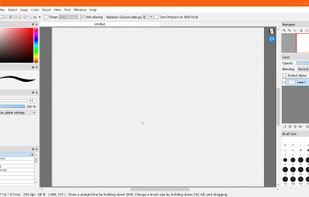
FireAlpaca is the image editor that can be used readily and easily. We made it possible to provide the completely free download, in order for our products to be experienced by more users from all over the world. It is available for both Mac and Windows users!

Cost / License
- Free
- Proprietary
Application typeApplication types
Platforms
- Mac
- Windows
- Linux


Features
Highlights All activities
FireAlpaca News & Activities
Recent News
No news, maybe you know any news worth sharing?
Share a News Tip
Recent activities
 cel added FireAlpaca as alternative to Capy Canvas and Darkly
 Neon pop added FireAlpaca as alternative to ReveriePaint
 Yassine B added FireAlpaca as alternative to ImageFlow.dev
 Dennis-5303 added FireAlpaca as alternative to Scumble
 cel added FireAlpaca as alternative to Patchy Image Editor
 Serious Goose added FireAlpaca as alternative to PhotoSuite
- Dakota_Nomad liked FireAlpaca
 cel added FireAlpaca as alternative to Kala Paint
 Paul added FireAlpaca as alternative to PhotoFlare Studio
 Paul added FireAlpaca as alternative to ItsPaint


Free tools (Software that can help you mostly in any field)
This is going to be a list of the free tools/software that can be used mostly in any field. it's based on websites recommendations, personal experience and YouTube videos. If there's any software that you like to be added here pls inform me so we can do it together. They won't be in the alphabetical order. Together we can do it. If you find any software in the list that's not free let me know


Linux • Graphics
My personal list of graphics applications made or ported to linux (Incomplete)


Academia & Skills
A list with 422 apps by AmileyaRyver without a description.
Official Links
Install from the command line
winget install -e --id FireAlpaca.FireAlpacabrew install --cask firealpaca
Developed by
UnknownLicensing
Proprietary and Free product.Rating
Average rating of 3.8Alternatives
136 alternatives listedBadge
Get an embeddable badge for FireAlpacaSupported Languages


Comments and Reviews
After trying everything on the market to date (2023), in my opinion FireAlpaca combines the best features of every tradigital inking and painting software on the planet. What beaths them all is the simple fact that FA is a FREEWARE and offers endless customizations and brushes, as well as accepts requests for video tutorials and suggestions for upgrades. The only limitation of this program is your creativity. I'm sold, thank you, Japan!
As a lot of comments say, FireAlpaca is very similar to PaintTool SAI in the interface. With a a huge difference : the brush engine is poor and the blender is a joke. SAI has a beautiful blender engine and FireAlpaca just cannot compete with that. FireAlpaca has some nice options (it manages CYMK) but, to be honest, I think there is no reason to prefer it to the other softwares. You may try it if you need some free light tool that manages basic artist features. Conclusion: don’t believe people saying that FireAlpaca is a good alternative to SAI. It is not.
As far as free drawing software goes, FireAlpaca is user-friendly, as in it has a vv basic tools and functionalities. It offers layer effects like what you would see in Photoshop but unlike the latter, albeit it does have some cool brushes installed, you can't fully customize the brush or canvas texture here. If you're thinking of installing this for animating or something close to that, it can feel a tad time consuming since you can't really animate here. Instead, you'd have to export your individual frames and import it to any editing software you have to animate it. But strangely enough, it does offer a preview button and you can make simple gif animation on their official site. If you're into using this program for graphic design like making infographics or posters, you can utilize the tools i guess? but fair warning that the tools/interface can be VERY restricting. Would not recommend this as an alternative software but I would recommend this to new artists who's still learning how to use digital art softwares.
it's so good
Firealpaca is a great software that you can use to animate, draw, and edit images! I love it so much and it really helps with all my hobbies!
I love it because you could make animations and gifs on there! ❤️❤️❤️
Ok what i hate about it is that when i want yo use the brush tool it makes me use the hand tool, second i hate how the pain bucket tool doesn't fill in the space all the way, it just leaves the border completely uncolored