🎬 VIDEO RECORDING
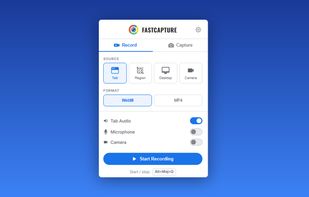
Record anything on your screen with multiple source options:
- Tab - Record the current browser tab with audio
- Desktop - Record your entire screen or a specific window
- Region - Draw a custom rectangle to record only a specific area
- Camera - Record from your webcam
Export your recordings in WebM (VP8/VP9) format. Pro users can also export in MP4 (H.264) or GIF (animated clips).
Recording controls:
- Pause & Resume - Take a break and continue recording later
- Discard - Delete the recording without saving
- Configurable countdown - 3s, 5s, or 10s delay before recording starts
- Customizable keyboard shortcuts to start and stop recording instantly
📸 SCREENSHOT CAPTURE
Capture any part of any webpage with four powerful modes:
- Visible Area - Capture exactly what you see on screen
- Full Page - Automatically scroll and stitch the entire webpage into a single image
- Region - Draw a rectangle to capture a specific area
- All Tabs - Capture every open tab in the current window at once
Save your screenshots as PNG (lossless), JPG, WebP (Pro), or PDF. Full-page and multi-tab captures work seamlessly with all formats, including multi-page PDFs.
?? ANNOTATION TOOLS
Draw, write, and highlight directly on any webpage:
- Freehand drawing with adjustable brush size and color
- Text, sticky notes, arrows, and shapes
- Blur tool to hide sensitive information before capturing
- Laser pointer for live presentations
- Image insertion for logos, diagrams, and references
- Three modes: edit (draw), display (view annotations), hidden (clean page)
- Side panel mode: annotation controls stay invisible to screen recordings
Annotate before or after your capture. Everything is rendered as a transparent overlay - the page itself is never modified.
🎥 CAMERA OVERLAY
Add a floating webcam overlay to your recordings. Perfect for tutorials, presentations, and product demos. Choose from multiple shapes, resize and reposition freely, and toggle visibility during recording.
? QUICK CAPTURE
Enable Quick Capture in settings to instantly capture a region the moment you release the mouse - no need to click Confirm. Ideal for rapid-fire screenshots when you need to capture multiple areas quickly.
📁 AUTO-SAVE
Set up automatic saving to organize your captures effortlessly:
- Auto-save videos to a custom folder (default: FastCapture/Videos)
- Auto-save images to a custom folder (default: FastCapture/Images)
- Smart filename templates with page title, date, time, and counters
Combined with the "Download" after-capture option, you can capture and save in a single click - no preview window, no interruption.







 Paul added FastCapture as alternative to Obry
 fakecam added FastCapture as alternative to ShareX, Flameshot, Greenshot, Snagit and 47 more
 GDNForge

No comments or reviews, maybe you want to be first?