
EVB Player icon
EVB Player icon

EVB Player

EVB Player turns a folder of numbered videos or audio files into a playlist that remembers where you stopped. It is made for things you work through over days or weeks: online courses you downloaded, recorded lectures, audiobooks split into many files, language practice.
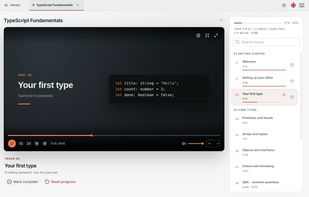
a folder open, with the track list, sections and saved progress.

Cost / License

  • Free
  • Open Source (MIT)

Application type

Platforms

  • Mac  macOS 13 or later, Apple silicon
  • Windows  Windows 10 or later, 64-bit (tested on Windows 11)
  • Linux  64-bit Debian, Ubuntu and derivatives
  • Online
0likes
0articles
Save

Features

Properties

  1.  Privacy focused

Features

  1.  Ad-free
  2.  No registration required
  3.  Works Offline
  4.  Dark Mode
  5.  Keyboard Shortcuts
  6.  Playback speed control
  7.  Resume playback
  8.  Playlists

EVB Player News & Activities

Highlights All activities

Recent activities

EVB Player information

AlternativeTo Categories

Audio & Music, Video & Movies, OS & Utilities, News & Books

GitHub repository

  •  0 Stars
  •  0 Forks
  •  0 Open Issues
  •   Updated  
View on GitHub
EVB Player was added to AlternativeTo by evb0110 on and this page was last updated .

No comments or reviews, maybe you want to be first?

Official Links

What is EVB Player?

EVB Player turns a folder of numbered videos or audio files into a playlist that remembers where you stopped. It is made for things you work through over days or weeks: online courses you downloaded, recorded lectures, audiobooks split into many files, language practice.

Files play in the order of the numbers in their names (10 comes after 9, not after 1), and subfolders become sections. The length of every file and of the whole folder is shown before you start. Your position in each file is saved as you go, finished files are ticked off, and the next one starts. You can mark files as done without playing them, reorder the playlist, star favorites, hide tracks and add tracks from other folders, and the files on disk stay as they are.

Several folders stay open in tabs. There are theater, full-window and fullscreen modes, speed control and keyboard shortcuts. No account, no ads, and nothing is uploaded. A browser version runs at evb-player-web.vercel.app with nothing to install.