
ElixirOffice icon
ElixirOffice icon

ElixirOffice

Open source office suite for users used to MS Office - multi-platform, tuned for performance.
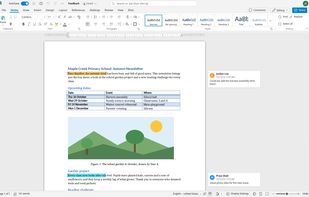
ElixirOffice screenshot 1

Cost / License

Platforms

  • Mac
  • Windows
  • Linux
  • AppImage
  • Self-Hosted
  • Docker
  • Nextcloud
0likes
0articles
Save

Features

Properties

Features

Highlights All activities

ElixirOffice News & Activities

Recent activities

ElixirOffice information

AlternativeTo Categories

Office & Productivity, System & Hardware

GitHub repository

  •  24 Stars
  •  0 Forks
  •  0 Open Issues
  •   Updated  
View on GitHub
ElixirOffice was added to AlternativeTo by Paul on and this page was last updated .

No comments or reviews, maybe you want to be first?

Official Links

What is ElixirOffice?

An open source office suite for people used to Microsoft Office.

ElixirOffice edits Word, Excel and PowerPoint documents (and their OpenDocument equivalents) with the ribbon, menus, dialogs and keyboard shortcuts of Microsoft Office. It runs as a desktop app that works entirely offline, or in the browser on your own server. It is free software (AGPLv3), private by design, and fast.

What makes it different:

  • It behaves like Microsoft Office. The same ribbon tabs and groups, KeyTips (Alt), mini toolbar, quick access toolbar, contextual tabs, and the same keyboard shortcuts: 228 Word shortcuts work on Windows and 171 on macOS, including Repeat (F4 / Ctrl+Y), Outline, Read and Draft views, fields, block selection, mail merge, Flash Fill, Quick Analysis, sections and the Slide Sorter. Muscle memory keeps working.
  • Your documents look right. Layout fidelity to Word is measured on a document corpus, release after release. Free metric-compatible fonts keep line and page breaks without Microsoft fonts, and in Chrome or Edge one click lets the editor use the fonts installed on your computer. School fonts (Marelle and Seyes-ruled cursive substitutes) are included.
  • Private by design. No telemetry, nothing sent to the publisher. In the desktop app and in the optional "convert locally" mode, documents never leave your computer: they are converted and edited entirely on your machine.
  • AI only if you want it. The suite is complete without AI. If you configure a model (any OpenAI-compatible service, including Ollama on your own computer), it can work on the structure of your document (styles, lists, tables, table of contents, page setup), with every change shown as a tracked change and undone in one step.
  • Your own cloud: Murena Workspace and Nextcloud. Connect your Murena Workspace or Nextcloud from the start page (secure Login Flow, revocable app password, nothing stored in the browser): browse, open, save back with conflict protection, recent files, new documents and uploads. Your real name appears on comments, tracked changes and co-editing. An app to edit directly from Nextcloud Files is coming in an upcoming beta, and the connection is coming to the desktop app later.
  • International. Every feature works in many languages: 45 interface languages, 49 spelling dictionaries (39 languages), a thesaurus in 17 languages.

