Dory icon
Dory icon

Dory

A zero-config Mac app switcher that learns your habits. Click your mouse and type - no shortcuts to remember. Simple. Fast. Effortless.
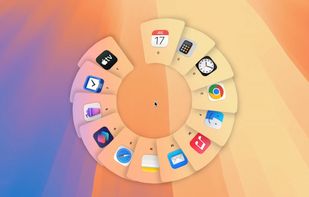
Dory screenshot 1

Cost / License

  • Pay once
  • Proprietary

Platforms

  • Mac
0likes
0comments
0articles

Features

Properties

  1.  Privacy focused
  2.  Lightweight

Features

  1.  Ad-free
  2.  No Tracking
  3.  No registration required
  4.  Works Offline
  5.  Zero configuration

Dory News & Activities

Highlights All activities

Recent activities

  • Zwitch icon
    frnk-km added Dory as alternative to Zwitch
  • Macdeck icon
    Ethan-Y-Was-taken added Dory as alternative to Macdeck
  • FlowShelf icon
    mkworld-t0 added Dory as alternative to FlowShelf
  • Love Tap icon
    fuselabssoft added Dory as alternative to Love Tap
  • BetterCmdTab icon
    rokartur added Dory as alternative to BetterCmdTab
  • Sxitch icon
    unsecretised added Dory as alternative to Sxitch
  • Command Reopen icon
    POX added Dory as alternative to Command Reopen
  • GroupCtrl icon
    POX added Dory as alternative to GroupCtrl
  • Radial icon
    POX added Dory as alternative to Radial
  • HopTab icon
    POX added Dory as alternative to HopTab

Dory information

  • Developed by

    Segev Sherry
  • Licensing

    Proprietary and Commercial product.
  • Pricing

    One time purchase (perpetual license) that costs $4.
  • Alternatives

    45 alternatives listed
  • Supported Languages

    • English
Dory was added to AlternativeTo by Paul on and this page was last updated .
No comments or reviews, maybe you want to be first?

What is Dory?

Dory is an app switcher for people who can’t remember shortcuts.

Just click your middle mouse button (or right Command key) and start typing the app name. Type the first letter, middle letters, an acronym, or a similar app name. You can also keep tapping the first letter to cycle through apps that start with it.

  • No custom letters.
  • No extra shortcuts.
  • No setup. Nothing to remember.

Dory works right out of the box - and over time, it learns which apps you use most and prioritizes them.

Simple. Fast. Effortless.

Official Links