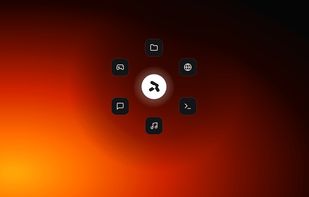
Rovyl is a radial launcher for Windows. One gesture opens anything on your machine — no window to manage, no list to scroll, no search box to type into.
HOW IT WORKS
Hold the middle mouse button anywhere in Windows. A wheel of your shortcuts blooms under your cursor. Move toward the one you want and release. The target opens and the wheel disappears. The whole interaction takes less than a second and never moves your hand off the mouse.
If the middle button is already taken by another tool, you can move the trigger to a side button or a global keyboard shortcut.
WHAT YOU CAN PUT ON THE WHEEL
- Applications, discovered automatically from your Start Menu
- Folders and files
- Websites, opened in your default browser
- Recent projects from editors that expose them
- Custom commands
WORKSPACES
Group your shortcuts into separate wheels and switch between them with a number key. One for work, one for games, one for whatever else — each with its own colour and its own contents. Drag them into whatever order suits you.
MADE TO STAY OUT OF THE WAY
Rovyl lives in the system tray and shows no window of its own. Focus protection keeps the wheel from appearing over fullscreen games, either automatically or for the specific titles you list. Precision mode trims the visual effects when you would rather have the response.
YOURS TO SHAPE
Accent colour, wheel radius, icon size, spacing, background blur and opacity, labels, clock, date, battery and weather. The centre of the wheel is a dead zone by default so releasing there cancels — or you can bind it to something.
PRIVACY
Rovyl runs entirely on your computer. No analytics, no telemetry, no advertising, no account required. It never records which apps you launch, what you type, or what is on your screen. Your shortcuts, layout and settings stay on your disk.
REQUIREMENTS
Windows 10 or Windows 11, and a mouse. A middle mouse button or side buttons are recommended, though the wheel can be triggered from the keyboard instead.







No comments or reviews, maybe you want to be first?