Dim Dock icon
Dim Dock icon

Dim Dock

 Like

Lightweight, open-source Windows 11 system tray utility for controlling external monitor brightness over hardware DDC/CI.
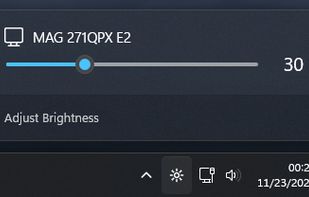
Dim Dock screenshot 1

Cost / License

  • Free
  • Open Source (MIT)

Application type

Since

  • New

Platforms

  • Windows  Windows 11
0likes
0articles
Save

Features

Properties

Features

Highlights All activities

Dim Dock News & Activities

Recent activities

Dim Dock information

GitHub repository

  •  0 Stars
  •  0 Forks
  •  0 Open Issues
  •   Updated  
View on GitHub

Popular alternatives

View all
Dim Dock was added to AlternativeTo by Ivan V on and this page was last updated .

No comments or reviews, maybe you want to be first?

Official Links

What is Dim Dock?

DimDock is a native Windows 11 system tray app for adjusting external monitor brightness directly through hardware DDC/CI rather than using a software screen overlay.

Left-clicking the tray icon opens a Windows 11 Fluent Acrylic flyout with per-monitor sliders and optional multi-monitor linking. You can also scroll directly over the tray icon to step brightness up or down in 1%, 2%, 5%, or 10% increments, and configure which monitor (or all monitors) the scroll wheel targets.

Built as a single NativeAOT Win32/Direct2D executable with no Electron or .NET runtime dependency, DimDock keeps a minimal memory footprint, matches your Windows theme and accent color, and includes zero telemetry. It supports automatic display rescanning after sleep/wake, optional startup with Windows, and automatic updates.

Note: Designed for desktop setups with external DDC/CI-capable monitors; built-in laptop displays are not supported.

Dim Dock Videos