Free DAEMON Tools Alternatives for Windows

There are many alternatives to DAEMON Tools for Windows if you are looking for a replacement. The best free Windows alternative is WinCDEmu, which is also Open Source. If that doesn't suit you, our users have ranked more than 25 alternatives to DAEMON Tools and many of them are free and available for Windows so hopefully you can find a suitable replacement. Other interesting free Windows alternatives to DAEMON Tools are Virtual CloneDrive, ImgBurn, ImDisk Virtual Disk Driver and Alcohol.

Copy a direct link to this comment to your clipboard
DAEMON Tools alternatives page was last updated

Alternatives list

  1. WinCDEmu icon
     536 likes

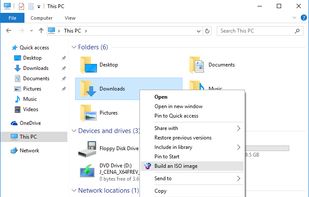
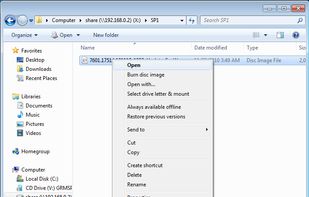
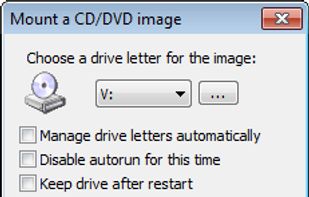
    WinCDEmu is an open-source CD/DVD/BD emulator - a tool that allows you to mount optical disc images by simply clicking on them in Windows Explorer. If you have downloaded an ISO image and want to use it without burning it to a blank disc, WinCDEmu is the easiest way to do it.

    37 WinCDEmu alternatives

    Cost / License

    Application types

    Alerts

    • Discontinued

    Platforms

    • Windows
    • PortableApps.com
     
    |
    19
    Discontinued

    The project is no longer developed. Last version, 4.1, released on September 29, 2015, can be still downloaded from GitHub

    WinCDEmu vs DAEMON Tools Comments
    Top Positive Comment
    Guest
    6

    It works great, is open-source, extremely lighweight and comes with few useful options.

    Top Negative Comment
    rboehme
    2

    In contrast to Daemon Tools, WinCDEmu doesn't support audio CDs.

    Hexaae
    Positive
    0

    WinCDEmu is very good for data CDs/DVDs, but unfortunately can't for example handle old mixed data CDs (e.g. old games from Win98/Amiga era with data+music). Daemon Tools Lite can do that instead, just for example.

    3 of 19 comments
    • WinCDEmu is Free and Open SourceDAEMON Tools is Freemium and Proprietary
    • WinCDEmu is LightweightDAEMON Tools is not according to our users
  2. Virtual CloneDrive works and behaves just like a physical CD/DVD drive, however it exists only virtually. Image files of various formats (.iso, .bin, etc) can be mounted onto a virtual drive from your hard-disk or from a network drive and used in the same manner as inserting...

    Cost / License

    • Free
    • Proprietary

    Application type

    Alerts

    • Discontinued

    Platforms

    • Windows
     
    |
    1
    Discontinued

    The latest version (5.5.3.0) is from February 2025.

    Virtual CloneDrive vs DAEMON Tools Comments
    bystro
    Positive
    1

    Very simplistic interface and easy to use. Unlike Daemon Tools' complicated one

    • Virtual CloneDrive is Free and ProprietaryDAEMON Tools is Freemium and Proprietary
  3. ImgBurn icon
     1529 likes

    ImgBurn is a lightweight CD / DVD / HD DVD / Blu-ray burning application (39 languages) that everyone should have in their toolkit. ImgBurn supports a wide range of image file formats. It can burn Audio CDs from any file type supported via DirectShow / ACM.

    52 ImgBurn alternatives

    Cost / License

    • Free Personal
    • Proprietary

    Application types

    Alerts

    • Discontinued

    Platforms

    • Windows
     
  4. Alcohol icon
     126 likes

    Alcohol is a powerful Windows CD and DVD burning software that makes it easy to create backups of DVDs* and CDs. In addition, the program lets you store your most used CDs as images on your computer, so you can call them up at the click of a button.

    Cost / License

    • Freemium
    • Proprietary

    Application types

    Alerts

    • Discontinued
    • Bundleware

    Platforms

    • Windows
     
  5. Emulates up to 18 virtual DVD, Blu-ray, and Ultra HD drives on Windows, mounts and unmounts .iso, .img, .miniso, .nrg, and other formats, integrates with Windows Explorer, supports shell context menu, offers auto-mount, auto-unmount, multilingual UI, and is free to use.

    Cost / License

    • Free
    • Proprietary

    Application types

    Alerts

    • Discontinued

    Platforms

    • Windows
     
  6. ImgDrive icon
     7 likes

    Mount as many as seven images to virtual drives with this simple program that will indeed make your relation with image files become a simpler one.

    Cost / License

    • Freemium
    • Proprietary

    Application type

    Platforms

    • Windows
     
  7. OSFMount icon
     25 likes

    OSFMount allows you to mount local disk image files (bit-for-bit copies of a disk partition) in Windows with a drive letter. You can then analyze the disk image file with PassMark OSForensics by using the mounted volume's drive letter.

    Cost / License

    • Free
    • Proprietary

    Application type

    Alerts

    • Discontinued

    Platforms

    • Windows
     
  8. A software package to preserve all storage media from the very old to the cutting edge, as well as to give detailed information about any supported image file & to extract the files from those images.

    Cost / License

    • Free
    • Open Source

    Platforms

    • Mac
    • Windows
    • Linux
     
  9. gBurner Virtual Drive is a free utility designed for creating and managing virtual CD / DVD drives. For anyone who deals with CD/DVD-based programs - it is a MUST.

    Cost / License

    • Free
    • Proprietary

    Application types

    Platforms

    • Windows
     
  10. VirtialDVD is a powerful solution that can mount various disk-image files including LCD format. Maximize user convenience and Minimize using system resources.

    Cost / License

    • Free Personal
    • Proprietary

    Platforms

    • Windows
     
  11. Pismo File Mount Audit Package is an application that allows users to mount the contents of ZIP, ISO, Compact ISO, Compact File Set and Private Folder files to the file system as virtual folders.

    Cost / License

    • Free
    • Proprietary

    Platforms

    • Mac
    • Windows
    • Linux
     
12 of 22 DAEMON Tools alternatives