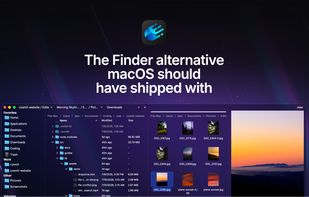
Cosmil is a file manager for macOS designed to feel like a modern, refined file explorer rather than a traditional utility. Its interface uses window transparency and background blur to blend with the desktop, while panes, the sidebar, preview area, and other interface elements can be resized or hidden to suit different workflows.
Each window can be split into as many panes as fit on screen — two, three, four, or more — with tabs available inside panes. Workspaces are restored on relaunch, including windows, tabs, active directories, and pane layouts.
Cosmil also adds file-management features that Finder either lacks or handles differently:
- Cut and paste with Cmd+X / Cmd+V, while retaining Finder-style Cmd+C / Cmd+Opt+V moves
- Cmd+N creates a file of any type, not just a folder
- On-demand folder-size calculation for any selection
- Detailed file-conflict dialogs with previews, parent folders, sizes, and timestamps
- Strictly ordered icon view without files drifting outside the pane
- A sidebar dropzone for temporarily parking files during drag-and-drop operations
- A job manager for active transfers and searches, with progress and cancellation
- Open With support for folders as well as files
- Custom nameable sidebar categories and ordering
- Resizable and reorderable list-view columns
- Fully customizable theming support with the ability to name, switch between, and share many different themes
Cosmil 2.3 adds direct remote-location support for FTP, SFTP, SMB 2/3, and WebDAV. Remote files can be previewed with Quick Look, transferred between any combination of local and remote locations, dragged into other applications, and opened for editing in normal Mac apps with saved changes uploaded back to the server. NAS devices can also be discovered from the Network section.
Installed cloud providers such as iCloud, Dropbox, and OneDrive integrate with the sidebar, including cloud-file status and download progress.
Native macOS behavior is retained where appropriate, including spacebar Quick Look previewing, the system Share sheet, native file icons, and familiar drag-and-drop behavior. Cosmil is built with Rust, Tauri 2.0, and Svelte 5.
Cosmil does not collect analytics or telemetry. Network activity is used for licensing, update checks, and user-initiated connections to remote locations.
A full-featured 14-day free trial can be started from within the app. After the trial ends, a license is required to continue using Cosmil. Licenses are a one-time purchase for 1, 3, or 5 Macs, with no subscription.







 Iakov-Senatov added Cosmil as alternative to mimiNavigator
 Justin added Cosmil as alternative to Nimble Commander
 Justin added Cosmil as alternative to Bloom File Manager
 Justin added Cosmil as alternative to Finder, ForkLift, Path Finder and Marta


No comments or reviews, maybe you want to be first?