

Cimanote
AI connects and organizes notes across your entire library, recommends structure, finds info in text and images, syncs offline across unlimited devices, opens instantly, imports Evernote data, and exports to multiple formats while ensuring user data ownership.
Cost / License
- Freemium (Subscription)
- Proprietary
Application types
Platforms
- Online
Features
Properties
- Distraction-free
- Privacy focused
- AI-Powered
Features
- WYSIWYG Support
- Real time collaboration
- Automatic Backup
- Cloud Sync
- No Tracking
- Live Preview
- Encrypted Backup
- Support for MarkDown
- Ad-free
- PDF annotation
- Goal Tracking
- OCR
- End-to-End Encryption
- Handwritten Notes
- Syntax Highlighting
- Full-Text Search
- Extensible by Plugins/Extensions
- Works Offline
- Hierarchical Structure
- Web Clipper
- Dark Mode
- File Tagging
- Knowledge Management
- Progressive Web App
- Team Collaboration
- Evernote import
- Checklists
Cimanote News & Activities
Recent activities
blagoja added Cimanote as alternative to Reflect Notes- blagoja added Cimanote as alternative to Google Keep
blagoja added Cimanote as alternative to HelixNotes and DEVONthink
Cimanote information
What is Cimanote?
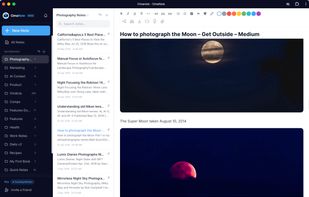
Cimanote is a note-taking app built on a simple idea: the intelligence should work across your whole library, not just the page you're writing on.
Most note apps help you write a note. Cimanote helps you use everything you've ever written. Its AI Knowledge Engine (Pro) organizes your library for you, connecting related notes, surfacing what's relevant while you write, recommending structure instead of leaving you to manage folders by hand, and answering questions across your entire collection of notes. The more you capture, the more useful it becomes. Search covers everything, including text inside images.
The foundations are built for speed and trust. Cimanote opens in under a second, works fully offline, and syncs across unlimited devices on every plan. It installs straight from the browser on desktop or mobile, no app store required.
Moving in is one click: import your Evernote .enex files and your notes, notebooks, tags, and attachments arrive with their structure intact, usually in under a minute. Moving out is just as easy: export your full library to Markdown, PDF, or HTML anytime, on any plan. Your notes are yours.
Free plan: fast notes, checklists, tags, sharing, offline access, and unlimited devices. Pro: the AI Knowledge Engine, organization, recommendations, and answers across everything you know.