




Bluetooth Battery Monitor
3 likes
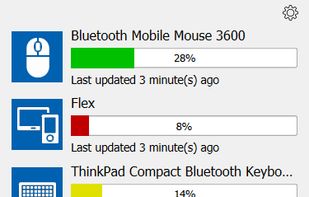
Real-time Bluetooth battery monitoring with alerts, consolidated device info, system tray notifications, and support for a wide range of devices including vendor-specific and select non-Bluetooth gaming hardware.


Features
Highlights All activities
Bluetooth Battery Monitor News & Activities
Recent activities
 aldikiller added Bluetooth Battery Monitor as alternative to BleAirDock
 Jos Zien added Bluetooth Battery Monitor as alternative to VisoDyne Battery Monitor
 Paul added Bluetooth Battery Monitor as alternative to MacJuiceMonitor
 Danilo Venom added Bluetooth Battery Monitor as alternative to winpods, NoiseBuddy and ToothFairy
- Danilo Venom updated Bluetooth Battery Monitor
- kamoltuk2001 liked Bluetooth Battery Monitor
 jmaster85 added Bluetooth Battery Monitor as alternative to MagicPods
 jmaster85 added Bluetooth Battery Monitor as alternative to AirPodsDesktop


Developed by
 Luculent Systems, LLC
Licensing
Proprietary and Commercial product.Pricing
One time purchase (perpetual license) that costs $5.Alternatives
9 alternatives listedBadge
Get an embeddable badge for Bluetooth Battery MonitorSupported Languages
Comments and Reviews
Good, easy to use and good basic GUI. it is showing bluetooth devices battery level but commercial.