
VisoDyne Battery Monitor icon

VisoDyne Battery Monitor

All-in-one battery monitor for Windows: Bluetooth, 2.4GHz, AirPods, controllers, mice, and keyboards. Live tray icons per device, custom alerts, full customization.
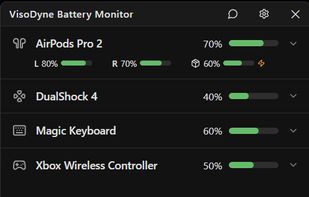
VisoDyne Battery Monitor screenshot 1

Cost / License

  • Freemium (Pay once)
  • Proprietary

Application type

Platforms

  • Windows
1like
0articles
Save

Features

Properties

Features

Highlights All activities

VisoDyne Battery Monitor News & Activities

Recent activities

VisoDyne Battery Monitor information

  • Developed by

    NL flagVisoDyne
  • Licensing

    Proprietary and Freemium product.
  • Pricing

    One time purchase (perpetual license) that costs up to $7 + free version with limited functionality.
  • Alternatives

    5 alternatives listed
  • Badge

    Get an embeddable badge for VisoDyne Battery Monitor
  • Supported Languages

    • English
    • Arabic
    • Danish
    • German
    • Spanish
    • Finnish
    • French
    • Hebrew
    • Hindi
    • Indonesian
    • Italian
    • Japanese
    • Korean
    • Dutch
    • Norwegian
    • Polish
    • Portuguese
    • Russian
    • Swedish
    • Thai
    • Turkish
    • Ukrainian
    • Vietnamese
    • Chinese
    • Afrikaans
    • Albanian
    • Amharic
    • Armenian
    • Assamese
    • Azerbaijani
    • Basque
    • Belarusian
    • Bengali
    • Bosnian
    • Bulgarian
    • Catalan; Valencian
    • Croatian
    • Czech
    • Estonian
    • Galician
    • Georgian
    • Greek
    • Gujarati
    • Hausa
    • Irish
    • Igbo
    • Hungarian
    • Inuktitut
    • Icelandic
    • Kannada
    • Khmer
    • Kazakh
    • Kinyarwanda
    • Kirghiz, Kyrgyz
    • Kurdish
    • Luxembourgish
    • Lithuanian
    • Lao
    • Latvian
    • Macedonian
    • Malay
    • Malayalam
    • Maltese
    • Maori
    • Marathi
    • Mongolian
    • Norwegian Bokmål
    • Nepali
    • Oriya
    • Panjabi, Punjabi
    • Persian
    • Quechua
    • Romanian
    • Sindhi
    • Serbian
    • Scottish Gaelic; Gaelic
    • Sinhala, Sinhalese
    • Slovak
    • Slovene
    • Swahili
    • Tamil
    • Telugu
    • Tajik
    • Tigrinya
    • Turkmen
    • Tagalog
    • Tswana
    • Tatar
    • Uighur, Uyghur
    • Urdu
    • Uzbek
    • Welsh
    • Wolof
    • Xhosa
    • Yoruba
    • Zulu
VisoDyne Battery Monitor was added to AlternativeTo by Jos Zien on and this page was last updated .

No comments or reviews, maybe you want to be first?

Official Links

Install from the command line

  • winget install -e --id VisoDyne.BatteryMonitor

Be careful what you paste into a terminal. Check what a command installs before running it.

What is VisoDyne Battery Monitor?

There's no shortage of battery apps for Windows, just none that cover everything. Some just show AirPods. Some only work with generic Bluetooth headsets. Others are built for one controller brand. If you've got a mix of device types, that usually means installing multiple tools just to check how much charge is left.

VisoDyne Battery Monitor fixes that. Connect anything: AirPods, Bluetooth headphones, wireless mice and keyboards, or a DualShock or Xbox controller, and it shows up as its own icon in the system tray with a live battery percentage.

For AirPods and similar earbuds, left ear, right ear, and case can be tracked separately. You can keep them as three icons, merge left and right into one, or hide the case icon entirely.

Hovering over any tray icon shows an estimate of how much time is left on that device. Some devices only report battery in rough steps, like every 10%, instead of an exact number. VisoDyne Battery Monitor tracks how fast each step drops and uses that to estimate a more precise percentage and time remaining.

Low-battery thresholds come with sensible defaults, but you can set them to any percentage and choose the message and urgency yourself. Icon styles, colors, and which devices show up in the tray are all configurable too, with more customization options planned in future updates.

The Community version is free forever, with no account and no expiry. It includes most features, such as notifications, viewing one device from the tray, and viewing all devices from the app. Pro unlocks some extra features. Every install starts with the free Community version and can be upgraded to Pro at any time.

