


Be nice
1 like
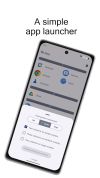
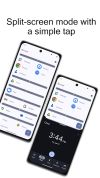
Be nice is a tiny app launcher. Its sole purpose is to launch apps in split-screen mode. This is more than convenient if an app forces the device into portrait mode. While portrait mode is the preferred orientation on smartphones, tablets and foldables are often used in...


 EU
EUPlatforms
- Android
- F-Droid

Features
Highlights All activities
Be nice News & Activities
Recent activities
 keepitlocal added Be nice as alternative to Fokus Launcher
 Alaik added Be nice as alternative to monocles launcher, EasyLauncher, Bliss Launcher, InkOS and 1 more
 Alaik added Be nice as alternative to Simple App Launcher and FLauncher - Android TV
 Alaik added Be nice as alternative to OpenLauncher
 Alaik added Be nice as alternative to KISS Launcher
 Alaik added Be nice as alternative to Pie Launcher and LeanbackLauncher
 Alaik added Be nice as alternative to YAM Launcher and Aster Launcher
 Alaik added Be nice as alternative to Neo Launcher and HayaiLauncher
 Alaik added Be nice as alternative to Discreet Launcher
 Alaik added Be nice as alternative to Shade Launcher and Sentien Launcher


Developed by
 Thomas Künneth
 Licensing
Open Source (Apache-2.0) and Free product.Alternatives
48 alternatives listedBadge
Get an embeddable badge for Be niceSupported Languages



No comments or reviews, maybe you want to be first?