Fokus Launcher icon
Fokus Launcher icon

Fokus Launcher

An Android launcher for people who want a simpler, cleaner default experience, focusing on fast access to time, weather, and core apps, with minimal visual noise.
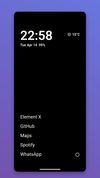
Minimal Launcher
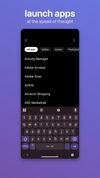
Launch Apps by Typing
+3
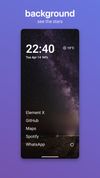
Add a Background

Cost / License

Platforms

  • Android
  • F-Droid
0likes
0articles
Save

Features

Properties

Features

Highlights All activities

Fokus Launcher News & Activities

Recent activities

Fokus Launcher information

AlternativeTo Category

OS & Utilities

GitHub repository

  •  273 Stars
  •  32 Forks
  •  13 Open Issues
  •   Updated  
View on GitHub
Fokus Launcher was added to AlternativeTo by keepitlocal on and this page was last updated .

No comments or reviews, maybe you want to be first?

Featured in Lists

Apps I Use on GrapheneOS

If you are using GrapheneOS on your main phone, then you have made the first and most important step towards privacy in your daily life (in my opinion of course). Most people use their phones more than any other device, and have their phones on them almost all the time, so ensuring that your phone is as private as you can reasonably and comfortably make it is a great move. Switching the operating system is only the first step however. If you move from an iPhone full of big tech apps to GrapheneOS and then install all those apps again, what is the point? Sure, you will have a more private and secure system, but you would subject yourself to being tracked every time you open an app. So, we need to find alternatives to these apps, that are open source, don't track us, keep everything possible local, and don't have an ulterior agenda beyond being the tool you are looking for.
By keepitlocal64 appsUpdated

What is Fokus Launcher?

Fokus Launcher is an Android launcher for people who want a simpler, cleaner default experience. It focuses on fast access to time, weather, and core apps with minimal visual noise.

Home Screen

The home screen is intentionally minimal: a large clock and date, battery status, optional weather, configurable favorite app labels, and a configurable right-side shortcut rail. Tap the clock, date, or weather to open the apps you configure for each in settings. Primary interactions are gesture-based: swipe up to open the app drawer, swipe down to expand the notification shade, and swipe left or right to launch shortcut targets.

App Drawer

The drawer supports quick search, categories you define in settings, and optional alphabetical or most-opened app order. When only one app matches a search, Fokus can launch it directly. Optional category sidebar mode replaces the inline search bar with a vertical category rail; use the search icon when you need text search. Long-pressing an app offers add to home, rename, hide, and uninstall.

Dot search keeps you in that same field for web or in-app search. Type a period, a space, and your query, for example ". cats"; that searches in your browser by default until you change the default under Dot search in settings. For letter shortcuts, type a period, one lowercase letter, a space, and your query, for example ".a coffee" when you assigned the letter "a" there. Dot search settings also list search-capable apps and lets you add HTTPS or deep-link URL templates with a placeholder for the query.

Customization

Edit home apps, configure right-side shortcuts (including launcher shortcut actions), hide or rename apps, choose a custom font, and manage launcher data from the settings screen.

Weather

Weather is powered by Open-Meteo. No account or API key is required. Results are cached for 30 minutes. Location permission is optional and only used for local weather.

Work Profile

Work profile apps are shown alongside personal apps in the drawer when a work profile is active on the device.

Private Space (Android 15+)

On Android 15 and above (API 35+), Fokus supports Android's Private Space with lock/unlock controls and a separate section in the app drawer for private apps when the space is unlocked.

Optional Device Controls

These features only work if you turn on accessibility for Fokus in Android settings.

Double tap to lock can turn off the screen from empty home space. Return home after long lock can bring Fokus back to the foreground on unlock once the device stayed locked longer than a threshold you choose.

First-Run Onboarding

On first launch, Fokus walks you through welcome, optional location permission, default-launcher setup, home-screen customization, swipe-shortcut setup, and quick gesture tips.

Permissions

Fokus asks only for what it uses.