Free Illustrator Alternatives for Windows

There are many alternatives to Adobe Illustrator for Windows if you are looking for a replacement. The best free Windows alternative is Inkscape, which is also Open Source. If that doesn't suit you, our users have ranked more than 50 alternatives to Adobe Illustrator and many of them are free and available for Windows so hopefully you can find a suitable replacement. Other interesting free Windows alternatives to Adobe Illustrator are Figma, Affinity, MyPaint and GodSVG.

filter to find the best alternatives

Adobe Illustrator alternatives are mainly Vector Graphic Apps, but if you're looking for Image Editors or Digital Painting Tools you can filter on that. Other popular filters include Open Source, Mac, Free, Android, Linux, iPad and Windows + Free. You can also filter by region, for example EU-based alternatives if you prefer software developed in the European Union. These are just examples - use the filter bar below to find more specific alternatives to Adobe Illustrator.
Copy a direct link to this comment to your clipboard
Adobe Illustrator alternatives page was last updated

Alternatives list

  1. Inkscape icon
     2344 likes

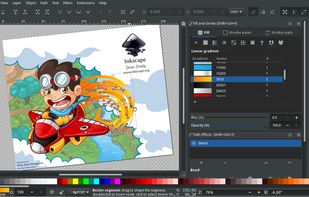
    Unlike Illustrator, Inkscape is completely free and open source, and it uses Scalable Vector Graphics (SVG) as its native format. This lightweight app is usually recommended if you don't have a powerful computer, as it also has many of the useful features from illustrator, including layers, grouping objects, drawing, shape, calligraphy, pencil tools, path simplification with variable threshold, bitmaps, and boolean operations. Plus, you can open or import a wide range of file formats including SVG, PDF, EPS, CDR, or even AI (Adobe Illustrator).

    126 Inkscape alternatives

    Cost / License

    Platforms

    • Mac
    • Windows
    • Linux
    • BSD
    • Snapcraft
    • Flathub
    • PortableApps.com
    • Haiku
     
    |
    38
  2. Figma icon
     257 likes

    Figma has a bigger focus on UI design, wireframing and collaborative work. Like Sketch, its interface is cleaner and easier to understand than Illustrator. It's can also be used throught web browsers and collabore with more members of your team in real time. It features automatic cloud synchronization so you can use your files on the platform you want, in addition to unique features such as arc tools and vector networks, which allow non-designers to format their templates easily. Animated prototypes are definitely a great advantage to interact with your design before coding.

    116 Figma alternatives

    Cost / License

    • Freemium
    • Proprietary

    Application types

    Platforms

    • Mac
    • Windows
    • Online
    • Android
    • iPhone
    • Chrome OS
    • Android Tablet
    • iPad
    • Software as a Service (SaaS)
     
    |
    2
  3. Affinity icon
     73 likes

    Unified design solution merging advanced photo, vector, and layout tools for seamless workflow, non-destructive editing, RAW support, batch processing, AI enhancements, GPU acceleration, file compatibility, cloud asset integration, and tailored workspace options.

    78 Affinity alternatives

    Cost / License

    • Freemium
    • Proprietary

    Platforms

    • Mac
    • Windows
     
  4. MyPaint icon
     394 likes

    The biggest difference with Illustrator is that MyPaint works with bitmaps instead of vector graphics. It's open source software designed mainly to illustrate and draw with a digitizer tablet. It has a simple interface, where almost all the basic drawing functions are assigned to keyboard shortcuts, which improves workflow speed. In addition, you can hide the entire graphical interface and focus all attention on the drawing without being distracted by unnecessary or complex buttons or palettes. It's a good option if you are interested in digital illustration without too many overwhelming features.

    131 MyPaint alternatives

    Cost / License

    Application type

    Platforms

    • Mac
    • Windows
    • Linux
    • PortableApps.com
     
    |
    6
  5. GodSVG icon
     36 likes

    Interactive vector editor built with Godot for creating or editing SVG files, featuring UI-based element manipulation, live code updates, direct markup access, no added metadata, minimal abstraction, clean output, and intended use on desktop plus mobile devices.

    Cost / License

    • Free
    • Open Source (MIT)

    Application type

    Platforms

    • Mac
    • Windows
    • Linux
    • Online
    • Android
     
    |
    1
  6. LazPaint icon
     46 likes

    Raster & vector graphic editor with many tools and filters, written in Lazarus. Portable, 32bit & 64bit versions, ORA format & 16384x16384 image support. In app 3D import & rendering.

    43 LazPaint alternatives

    Cost / License

    Platforms

    • Mac
    • Windows
    • Linux
    • BSD
    • PortableApps.com
    • Flathub
    • Flatpak
     
  7. Draw, part of the Apache OpenOffice suite, is a graphics editor that gives you the tools to communicate with visuals and diagrams. With a maximum page size of 300cm by 300cm, Draw is powerful tool for posters, graphs, charts, and more.

    Cost / License

    • Free
    • Open Source

    Application type

    Platforms

    • Mac
    • Windows
    • Linux
     
    |
    1
  8. sK1 icon
     37 likes

    sK1 is an open source cross-platform vector graphics editor like CorelDRAW, Adobe Illustrator, or Freehand. The major feature of sK1 is a professional precise printing and prepress ready PDF output.

    Cost / License

    Alerts

    • Discontinued

    Platforms

    • Windows
    • Linux
     
  9. Repath Studio icon
     3 likes

    A cross platform vector graphics editor, that combines procedural tooling with traditional design workflows. It includes an interactive shell, which allows evaluating code to generate shapes, or even extend the editor on the fly.

    Cost / License

    Application type

    Platforms

    • Mac
    • Windows
    • Linux
     
    |
    1
  10. An image and stencil editor for artists. Work with layers, remove backgrounds, use a gallery, pressure-sensitive drawing, customize colors/effects, and edit offline for full creative control.

    Cost / License

    • Free
    • Proprietary

    Application type

    Platforms

    • Windows
     
  11. Omber icon
     6 likes

    Omber is a new type of vector design program that lets you use color in new ways in your vector drawings. With Omber's advanced soft shading tools, you can easily make dramatic color blends or subtle color gradients in your art.

    Cost / License

    • Freemium
    • Proprietary

    Application type

    Platforms

    • Mac
    • Windows
    • Online
    • Android
    • iPhone
    • Chrome OS
    • iPad
     
12 of 20 Adobe Illustrator alternatives