@MAX SyncUp Alternatives

@MAX SyncUp is described as 'Feature-rich utility for backing up and synchronizing data on a local network or over the Internet. @MAX SyncUp provides an Apple Time Machine style backup using hard links. It allows for the effective remote synchronizing through an RSync-like algorithm to' and is a File Sync tool in the backup & sync category. There are more than 50 alternatives to @MAX SyncUp for a variety of platforms, including Windows, Mac, Android, iPhone and Web-based apps. The best @MAX SyncUp alternative is Dropbox, which is free. Other great apps like @MAX SyncUp are FreeFileSync, Duplicati, rsync and Box.

Copy a direct link to this comment to your clipboard
@MAX SyncUp alternatives page was last updated

Alternatives list

  1. vBoxxCloud icon
     61 likes
    Copy a direct link to this comment to your clipboard

    vBoxxCloud is a GDPR Ready cloud solution help you store, edit and share files online and keeps your information private in the Netherlands. As a Cloud solution designed for businesses, it provides a robust central dashboard where you can manage users, organization and control...

    Cost / License

    • Subscription
    • Proprietary

    Platforms

    • Mac
    • Windows
    • Online
    • Android
    • iPhone
    • Android Tablet
    • Windows Phone
    • iPad
    • Microsoft Office Outlook
     
  2. Copy a direct link to this comment to your clipboard

    Karen's Replicator copies selected files from one drive/folder to another. Source and Destination folders can reside anywhere on your network.

    Cost / License

    • Free Personal
    • Proprietary

    Platforms

    • Windows
     
  3. Copy a direct link to this comment to your clipboard

    Directory Compare is a utility to help you keeping copies of your important directories (documents, programs under development and so on) in a backup hard disk or any other storage system (like USB drives or CD-RW disks).

    Cost / License

    • Free
    • Proprietary

    Application type

    Platforms

    • Windows
     
  4. Qtd Sync icon
     20 likes
    Copy a direct link to this comment to your clipboard

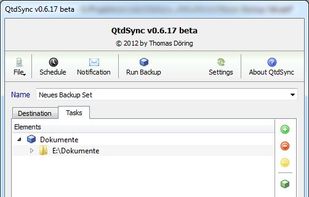
    A graphical interface for the Rsync engine that will synchronise files between two computers either locally or over the internet. The beauty of Rsync is that it only transfers the exact part of a file that has changed (differential synchronisation), saving bandwidth and time.

    Cost / License

    • Free
    • Open Source

    Platforms

    • Windows
    • Linux
     
  5. Bonkey icon
     7 likes
    Copy a direct link to this comment to your clipboard

    Despite a name that conjures up comedic visions, Bonkey the Backup Monkey is a serious backup program with tremendous potential. Not that it isnt good now; The program is easy to use, puts all the relevant options at your fingertips and backs up to multiple locations--including...

    Cost / License

    • Free
    • Open Source

    Application type

    Alerts

    • Discontinued

    Platforms

    • Mac
    • Windows
     
  6. Nimbox Vault icon
     7 likes
    Copy a direct link to this comment to your clipboard

    Beautifully secure collaboration tools, built for business. Grab your trial today!

    Cost / License

    • Pay once
    • Proprietary

    Platforms

    • Mac
    • Windows
    • Online
    • Windows Mobile
    • Android
    • iPhone
    • Android Tablet
    • Windows Phone
    • iPad
     
  7. BFileSync icon
     1 like
    Copy a direct link to this comment to your clipboard

    BFileSync is a simple file app to copy or move files between SD Card and other external storage media without rooting your device.

    Cost / License

    • Free
    • Proprietary

    Application type

    Platforms

    • Android
    • Android Tablet
     
  8. Copy a direct link to this comment to your clipboard

    Kup is created for helping people to keep up-to-date backups of their personal files. Connecting a USB hard drive is the primary supported way to store files, but saving files to a server over a network connection is also possible for advanced users.

    Cost / License

    • Free
    • Open Source

    Platforms

    • Linux
     
  9. Dropsync icon
     10 likes
    Copy a direct link to this comment to your clipboard

    DropSync is a super fast and flexible folder synchronization tool.

    It is ideal for a wide range of syncing tasks including:

    • Updating on-the-go documents to a USB stick
    • Backing up, or mirroring a website from a remote host to your local computer
    • Backing up precious file.

    Cost / License

    • Paid
    • Proprietary

    Application type

    Platforms

    • Mac
    • Windows
    • iPhone
    • iPad
     
  10. FilesAnywhere icon
     14 likes
    Copy a direct link to this comment to your clipboard

    FilesAnywhere offers free 1GB online file storage, with cloud storage solutions for Internet backup, file sharing, secure FTP hosting, and web folders for collaboration. Come enjoy the security of FilesAnywhere.

    166 FilesAnywhere alternatives

    Cost / License

    • Paid
    • Proprietary

    Application type

    Platforms

    • Mac
    • Windows
    • Online
    • Android
    • iPhone
     
  11. PureSync icon
     18 likes
    Copy a direct link to this comment to your clipboard

    PureSync is a professional file backup and synchronization software, that can automatically keep a backup of your important files, import files from your digital camera and synchronize the contents of multiple folders, but not from "Windows Mobile" devices and no...

    71 PureSync alternatives

    Cost / License

    • Free Personal
    • Proprietary

    Application type

    Platforms

    • Windows
     
  12. Nomadesk icon
     72 likes
    Copy a direct link to this comment to your clipboard

    Nomadesk is the easiest and most secure way to share, synchronize and backup files wherever you are, online or offline! Nomadesk offers a virtual fileserver that enables both on-line and off-line document management.

    Cost / License

    • Paid
    • Proprietary

    Application type

    Platforms

    • Mac
    • Windows
    • Online
    • Android
    • iPhone
    • Android Tablet
    • iPad
     
You are at page 4 of @MAX SyncUp alternatives