


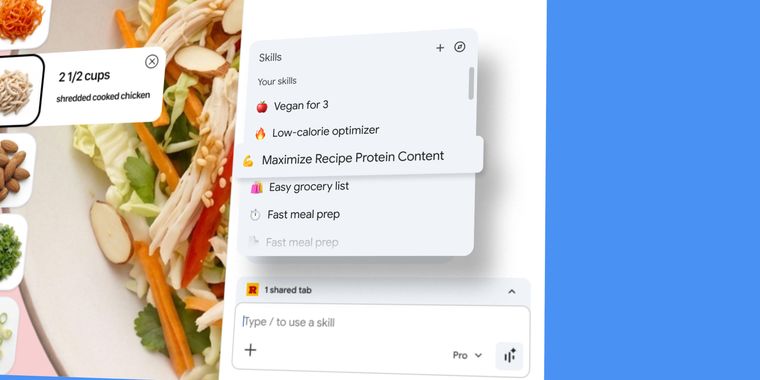

Google launches skills in Chrome for saving, customizing and reusing custom Gemini prompts
Google is rolling out skills in Chrome, a feature that lets users save and reuse their most helpful AI prompts with a single click. This update streamlines the way users interact with Gemini in Chrome by allowing any worthwhile prompt to be turned into a reusable skill, which can be accessed directly from chat history.
Once saved, these skills can be activated in Gemini in Chrome either by typing a forward slash or by clicking the plus sign. The feature runs the selected skill on the current page or across other chosen tabs. Users can edit their previously saved skills or create new ones at any time, supporting flexibility in day-to-day workflows.
Alongside custom skills, Google is providing a library of ready-to-use skills that cover common tasks and workflows. Users can add these skills to their personal list, try them out, and make adjustments to better meet their needs. Skills are protected by the same safeguards as Gemini in Chrome, requiring confirmation before taking sensitive actions such as adding a calendar event or sending an email. All saved skills are available on any signed-in Chrome desktop device.




- Web Browser
- Free
- Proprietary
Other apps mentioned in this article

Related news
External links
- Turn your best AI prompts into one-click tools in ChromeGoogle • Official source
- Chrome now lets you turn AI prompts into repeatable ‘Skills’The Verge
- Google adds AI Skills to Chrome to help you save favorite workflowsTechCrunch
- Chrome Skills let you save your favorite Gemini prompts for easy accessEngadget
- Google announces ‘Skills’ for Gemini in Chrome to run workflows9to5Google
- Google introduces "Skills" in Chrome to make Gemini prompts instantly reusableArs Technica
Comments
Why call it "skill"? A saved action or link was always called a "bookmark."