• DisableWinTracking icon
  • Unchecky icon
  • SysHardener icon
  • OSArmor icon
  • Avira Antivirus icon
  • +11

How To Set Up Windows For Less Tech-savvy Family Members

Tim_BTim_B16 appsUpdated
Copy a direct link to this comment to your clipboard

In this list, I'll give some suggestions on how to set up Windows for your less technically experienced family members. The goals are that it should be functional (i.e. not require debugging due to going overboard with modifications, like when installing browser extensions), safe, and privacy friendly.

The Basics

If you have a lot of bloatware on your Windows installation courtesy of the computer manufacturer, do a clean reinstall of Windows. You can find the license key that your computer uses using a tool like https://alternativeto.net/software/produkey/ . Once you have a clean Windows installation, create a local admin account and a local normal user account. Using the non-admin account for everything and only using the admin account to authorize software that needs admin privileges to run on the normal user account will protect the computer from 94% of critical Windows vulnerabilities. It does however not protect against crypto-miners like https://alternativeto.net/software/coinhive/ in my experience. We'll counter that later on. One problem with this account setup is that Microsoft has started demanding admin accounts to run Windows Update and even to just get notified of new updates, so Windows Updates has to be run when logged into the admin account. Tweak the privacy settings so that you're sharing the bare minimum of data with Microsoft while still keeping the OS functional. Install Windows Updates and when that is done, create a system restore point so that you can go back to this clean state if needed.

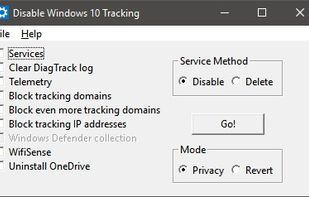
  1. A tool to use some of the known methods of disabling tracking in Windows 10. (Telemetry, DiagTrack Log, Services, hosts-file, IP blocking, Windows Defender / WifiSense, OneDrive).

    Cost / License

    • Free
    • Open Source

    Platforms

    • Windows
    DisableWinTracking screenshot 1
    Tim_BTim_B’s note

    Now that we have the basics set up, it's time to get rid of most of Microsoft's spyware, because we're not giving them Grandma's secret cookie recipies! DisableWinTracking will disable Windows tracking services. Just disable them; don't delete them in case they end up blocking more than the user would have liked. Personally, I have not noticed any problems caused by this software, and because it can easily restore back to the default state, it's pretty harmless.

  2. Unchecky icon
     Like

    Tired of unchecking unrelated offers while installing software?

    Have you ever felt, while installing software, that the installer tries to push additional unwanted programs at all cost? Ever missed a checkbox, and spent hours afterwards removing adware? Ever opened your browser.

    Cost / License

    • Free
    • Proprietary

    Application type

    Platforms

    • Windows
    Unchecky screenshot 1
    Unchecky screenshot 1
    26 languages
    Tim_BTim_B’s note

    Unchecky will automatically deselect adware from software installations. Installing this will make sure that the user won't get a bonus "system optimizer" or other junk when installing software.

  3. Free Windows OS security application that allows you to harden Windows settings to mitigate cybersecurity threats. With this tool you can restrict functionalities of Windows and secure vulnerable applications (i.e Office and Adobe Reader).

    Cost / License

    • Freemium
    • Proprietary

    Platforms

    • Windows
    SysHardener screenshot 1
    SysHardener screenshot 1
    SysHardener screenshot 2
    +3
    SysHardener screenshot 3
    Tim_BTim_B’s note

    SysHardener will, well, harden your Windows installation to protect it from threats like malware. Similar software like Hardentools icon Hardentools and Hard_Configurator icon Hard_Configurator offer very similar functionality, so if you feel like one of their feature sets fits you better, then go for that one instead. Just make sure that it's easy to restore system settings back to the defaults using the software you choose and that you have some understanding of what changes the selected settings in the software has on your system. Hard_Configurator's interface is a bit complicated, so I'd probably go with SysHardener or hardentools, which are more user-friendly. There's also SBGuard Anti-Ransomware icon SBGuard Anti-Ransomware, but that software doesn't have all the features that the previously mentioned software have.

  4. OSArmor icon
     Like

    Monitor and block suspicious processes behaviors to prevent infections by malware, ransomware, and other threats. This tool analyzes parent processes and prevents, for example, MS Word from running cmd or powershell utilities, it prevents ransomware from deleting shadow copies...

    Cost / License

    • Paid
    • Proprietary

    Application type

    Platforms

    • Windows
    OSArmor screenshot 1
    OSArmor screenshot 1
    OSArmor screenshot 2
    Tim_BTim_B’s note

    OSArmor will monitor the processes on the computer and block suspicious processes. There is other software - which you can find via OSArmor's AlternativeTo page - which is more in-depth and offers more protection, but they are harder to administrate and not as much of a discrete and "set and forget" software as OSArmor.

  5. Provides real-time malware, ransomware, and spyware protection with web safety, cloud-based updates, VPN, system optimization, and advanced repair tools.

    Cost / License

    • Freemium
    • Proprietary

    Application type

    Platforms

    • Mac
    • Windows
    Avira Antivirus screenshot 1
    Avira Antivirus screenshot 1
    Avira Antivirus screenshot 2
    +4
    Avira Antivirus screenshot 3
    Tim_BTim_B’s note

    Avira Free Antivirus offers good protection for free; however, it has a daily pop-up to get you to upgrade. There used to be a workaround using a software called BgPKiller which blocked the pop-ups, but it seems like some pop-ups are slipping through now. It's really not that bad though: you can close it with one click. There's also paid options like Avira Antivirus Pro and Avira Internet Security icon Avira Internet Security which include a built-in firewall (the main difference between Avira Antivirus Pro and Avira Internet Security is that Avira Internet Security includes a software and driver updater and a vulnerability patcher). When you have Avira installed you should uninstall the pretty useless Avira Browser Safety extension.

    You can check stats from lab tests between different antivirus software on FatSecurity.com icon FatSecurity.com. If you're wondering why I didn't mention Kaspersky, it's because there are some pretty serious security and privacy concerns. As for why I didn't mention Bitdefender, in my own and many others' experience it's a mess performance-wise and too buggy for me to recommend to anyone.

  6. Comodo Firewall is a personal firewall, a genre of security software that secures PCs by policing Internet traffic on an app by app basis. The most prominent feature of a personal firewall is generating popup notifications when an unknown program attempts to access the Internet...

    Cost / License

    • Free
    • Proprietary

    Application type

    Platforms

    • Windows
    A security popup is one of the most commonly seen user interface components of this app and its main purpose.
    Main window in basic view
    Main window in advanced view
    +7
    Main window in basic view, with the Manage Protection dashboard exposed
    Tim_BTim_B’s note

    In addition of being a firewall, Comodo Free Firewall also offers HIPS (Host Intrusion Prevention System) and sandboxing, making it the most secure option of the free firewalls that I know of. Comodo Free Firewall will change your default home page and search engine, so make sure to disable that setting on the first screen of the installer.

    If you have Avira Antivirus Pro or Avira Internet Security you don't need Comodo Free Firewall since the paid versions of Avira already have a firewall included in them.

  7. Open-source browser with Gecko engine, supporting HTML add-ons and providing privacy features like Enhanced Tracking Protection and third-party cookie blocking.

    Cost / License

    • Free
    • Open Source

    Application type

    Platforms

    • Mac
    • Windows
    • Linux
    • Android
    • iPhone
    • Android Tablet
    • BSD
    • HUAWEI AppGallery
    • iPad
    • AppImageHub
    • Snapcraft
    • Linux Mobile
    • Flathub
    • Samsung Galaxy Store
    • PortableApps.com
    • Haiku
    • Flatpak
    • Homebrew
    • Chocolatey
    • Gecko
    • F-Droid
    More protection from the start
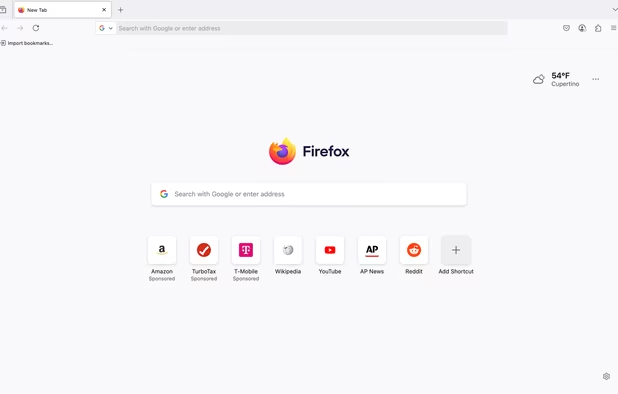
    Firefox Desktop (Light Theme)
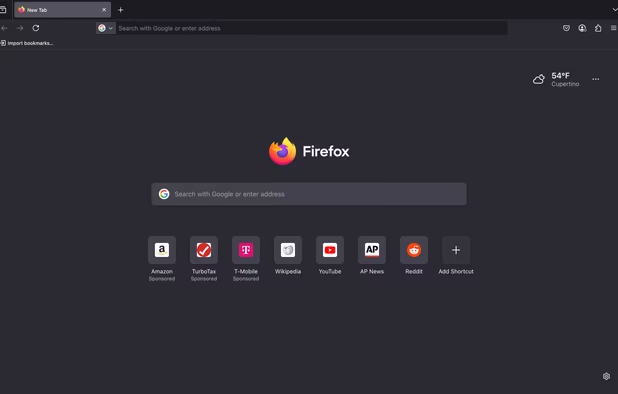
    Firefox Desktop (Dark Theme)
    +8
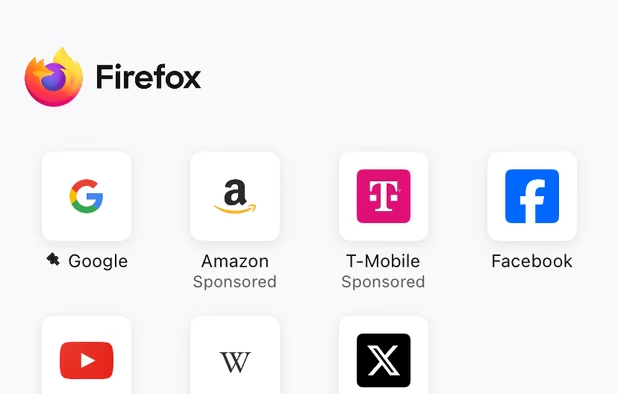
    Firefox iOS (Light Theme)
    Tim_BTim_B’s note

    I recommend Firefox above Chrome because it's open source and easier to customize thanks to its about:config. Speaking of about:config, start by setting network.IDN_show_punycode from false to true. This will make phishing attempts using unicode domain names that look identical to the original detectable to the human eye. If you decide to go with Chrome, there is currently no known way of fixing this. Like I said, Firefox is a lot easier to customize. Firefox is also more or less equal to Chrome when it comes to performance and speed since Firefox entered the WebExtensions era.

    The add-ons listed below are those security and privacy add-ons that you can just "set and forget" without having them cause too many website breakages. That is not a 100% guarantee, as there will always be trade-offs between convenience and security/privacy, but they're stable enough to not have to worry about it. Just make sure that there's a backup browser on the system in case uBlock Origin blocks too much of a website or any of the other add-ons causes website breakages.

  8. uBlock Origin (uBO) is a CPU and memory-efficient wide-spectrum content blocker. It blocks ads, trackers, coin miners, popups, annoying anti-blockers, malware sites, etc., by default using EasyList, EasyPrivacy, Peter Lowe's Blocklist, Online Malicious URL Blocklist, and uBO...

    Cost / License

    • Free
    • Open Source

    Application type

    Platforms

    • Microsoft Edge
    • Google Chrome
    • Thunderbird
    • Opera
    • Node.JS
    • Mozilla Firefox
    uBlock Origin screenshot 1
    uBlock Origin screenshot 1
    uBlock Origin screenshot 2
    +3
    uBlock Origin screenshot 3
    Tim_BTim_B’s note

    Using uBlock Origin in combination with the FilterLists icon FilterLists website, you will be able to block malware (including crypto-miners), ads, tracking, and even credit card skimming scripts. The surfing will be much safer since malware infested ads, also known as malvertising, is the source of 80% of malware infections. It will also be faster and use less data (up to 30% less on some sites) and also less battery power.

  9. Download Virus Checker provides automatic check for all your downloads through 68 online anti-virus solutions. Basically the extension sends your download link to VirusTotal service and wait for its response.

    Cost / License

    • Free
    • Open Source

    Application type

    Platforms

    • Mac
    • Windows
    • Linux
    • Google Chrome
    • Opera
    • Firefox
    Download Virus Checker screenshot 1
    Download Virus Checker screenshot 1
    Tim_BTim_B’s note

    Download Virus Checker will upload all downloaded binary files to VirusTotal icon VirusTotal where it will be analyzed by 68 different anti-virus engines. By default, the uploaded file has to get hits from three of the anti-virus engines in order for the user to be notified, so I recommend setting the threshold to one instead in order to protect from newer, less detected threats.

  10. HTTPS Everywhere is a browser extension produced as a collaboration between The Tor Project and the Electronic Frontier Foundation. It encrypts your communications with a number of major websites.

    Cost / License

    • Free
    • Open Source

    Application type

    Platforms

    • Online
    • Vivaldi Browser
    • Google Chrome
    • Yandex.Browser
    • Opera
    • Chromium
    • Firefox
    HTTPS Everywhere screenshot 1
    HTTPS Everywhere screenshot 1
    HTTPS Everywhere screenshot 2
    +1
    HTTPS Everywhere screenshot 3
    Tim_BTim_B’s note

    HTTPS Everywhere is an add-on developed by the Electronic Frontier Foundation (EFF) and The Tor Project that will enforce SSL encryption on larger (and some smaller) sites that entirely or partially support SSL. This will help the user's data stay encrypted while in transit, assuming that the website supports SSL and has had a HTTPS Everywhere ruleset written for it. Tor Browser icon Tor Browser uses HTTPS Everywhere as an integral part.

  11. Protects you against tracking through "free", centralized, content delivery. It prevents a lot of requests from reaching networks like Google Hosted Libraries, and serves local files to keep sites from breaking. Complements regular content blockers.

    Cost / License

    • Free
    • Open Source

    Application type

    Platforms

    • Mac
    • Windows
    • Linux
    • Android
    • Android Tablet
    • Google Chrome
    • Pale Moon
    • Opera
    • Chromium
    • Mozilla Firefox
    Decentraleyes screenshot 1
    Decentraleyes screenshot 1
    Decentraleyes screenshot 2
    +1
    Decentraleyes screenshot 3
    Tim_BTim_B’s note

    Decentraleyes prevents tracking from major content delivery networks by blocking requests to those CDNs and replacing the files with local files to keep sites from breaking.

  12. Control your cookies! This extension is inspired by Self-Destructing Cookies icon Self-Destructing Cookies. When a tab closes, any cookies not being used are automatically deleted. Prevent tracking by other cookies and add only the ones you trust.

    Cost / License

    • Free
    • Open Source

    Application type

    Platforms

    • Mac
    • Windows
    • Linux
    • Android
    • iPhone
    • Android Tablet
    • iPad
    • Google Chrome
    • Tor Browser Bundle
    • Chromium
    • Firefox
    Toolbar. Version 2.
    Export cookie expressions white list. Version 2.
    Settings. Version 2.
    +4
    Optional notifications. Version 2.
    Tim_BTim_B’s note

    Cookie AutoDelete is an add-on that automatically clears a site's cookies after the site has been closed, which helps prevent user tracking via tracking cookies. Go to the settings and deselect "Show Notification After Cookie Cleanup" or the add-on will annoy pretty much anyone and everyone using it.

  13. Privacy Settings lets you alter Firefox's built-in privacy preferences easily from a toolbar button. This extension aims to keep all the security settings in one place. There are different modes of operation based on your needs.

    Cost / License

    • Free
    • Open Source

    Platforms

    • Mac
    • Windows
    • Linux
    • Android
    • iPhone
    • Android Tablet
    • BSD
    • iPad
    • Haiku
    • Firefox
    Privacy Settings screenshot 1
    Privacy Settings screenshot 1
    Tim_BTim_B’s note

    Privacy Settings has two different modes of browser settings that improves the user's privacy: "Full Privacy" and "Enhanced Privacy". Set it to the "Enhanced Privacy" mode in order to ensure full compatibility and functionality with websites. Privacy Settings also has a "Reset to Defaults" button, which makes it easy to undo any changes.

  14. Google and Yandex search pages have the annoying habit of changing the result link when you click it. So if you right-click the link in order to copy it you get some gibberish instead of what you wanted.

    Cost / License

    • Free
    • Open Source

    Application type

    Platforms

    • Mac
    • Windows
    • Linux
    • Android
    • iPhone
    • Chrome OS
    • Android Tablet
    • BSD
    • iPad
    • Google Chrome
    • Haiku
    • Opera
    • Firefox
    Google search link fix screenshot 1
    Google search link fix screenshot 1
    Tim_BTim_B’s note

    Google search link fix will clean the URLs of Google and Yandex search results, giving the user tracking free direct links instead of annoying and privacy invasive redirect links.

  15. Clean URLs that are about to be visited.

    Cost / License

    • Free
    • Open Source

    Platforms

    • Online
    • Firefox
    Tim_BTim_B’s note

    Link Cleaner will remove tracking parameters from links. It also skips redirect pages on Facebook, Reddit, and Steam.

  16. This add-on allows users to prevent websites from using the Javascript API to fingerprint them. Users can choose to block the API entirely on some or all websites (which may break some websites) or just block or fake its fingerprinting-friendly...

    Cost / License

    • Free
    • Open Source

    Platforms

    • Mac
    • Windows
    • Linux
    • Mozilla Firefox
    CanvasBlocker screenshot 1
    CanvasBlocker screenshot 1
    Tim_BTim_B’s note

    CanvasBlocker blocks a fingerprinting technique known as canvas fingerprinting. The default "fake readout API" setting is the best option as it prevents tracking while ensuring compatibility and functionality.

Backups

Suggest to the user of the computer that they keep backups of their important data. USBs can be enough if they don't have much data to back up, otherwise an external hard drive should do the job. 1.5TB hard drives, 3TB hard drives, and any hard drive with Helium in it (i.e. hard drives that are larger than 6TB) are more likely to fail than other hard drives. This applies to HDDs and not SSDs, which are much more reliable regardless of size. Personally I'd stay away from Seagate, since they have a bit of a rocky history with hard drive reliability. When it comes to SSDs especially Samsung and also Intel are the kings of SSD reliability. There are external hard drives that have rugged rubber bumpers around the case and some are even waterproof, so those are extra secure, but obviously cost more than regular external hard drives. There are also waterproof USBs. A good idea is to keep at least one backup in another location than where the computer is in case of house fire, floods, or other disasters.

Comments

alterkerbb
2

Thank you for the suggestion, but there is some outdated information. "If you decide to go with Chrome, there is currently no known way of fixing this." The post of this situation was published at April, 2017. So you know what I'm saying.