• Wox Launcher icon
  • StandaloneStack icon
  • RocketDock icon
  • PStart icon
  • PortableApps.com icon
  • +5

Application Launcher for PC

Shoji VRShoji VR10 appsUpdated
Copy a direct link to this comment to your clipboard

Launch apps easily on PC !

  1. Wox is an open-source launcher for macOS, Linux, and Windows. It keeps local search, keyboard-first actions, and an extensible plugin system in one focused input.

    Cost / License

    • Free
    • Open Source

    Application type

    Platforms

    • Mac
    • Windows
    • Linux
    • Homebrew
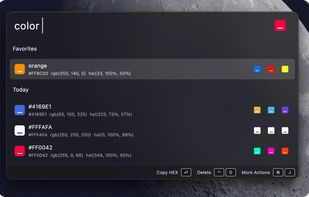
    Color plugin
    Confetti
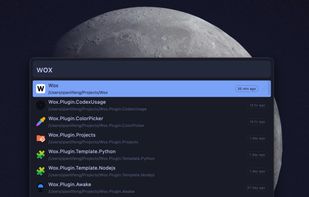
    Theme - tokyo
    +2
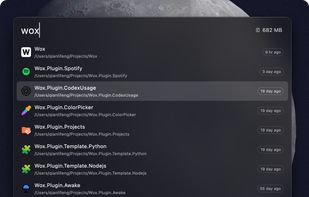
    Theme - glass dark
    Shoji VRShoji VR’s note

    Coming soon~

  2. If you have ObjectDock or RocketDock, you certainly know the stack docklet from Matonga.Now, if you don’t want any dock and simply use your taskbar, you can have stack view too.

    Just get StandaloneStack 2, create a shortcut and voilà, run it to show the stack.

    Standalon.

    Cost / License

    • Free
    • Proprietary

    Application type

    Platforms

    • Windows
    StandaloneStack screenshot 1
    StandaloneStack screenshot 1
    StandaloneStack screenshot 2
    Shoji VRShoji VR’s note
    • Low Resource and Simple and Easy to use
    • but Last Update 2008 which considered discontinued apps
  3. RocketDock is a Mac OS X dock clone. It provides a nice clean interface to drop shortcuts on for easy access and organization. With each item completely customizable there is no end to what you can add and launch from the dock.

    Cost / License

    • Free
    • Proprietary

    Application type

    Platforms

    • Windows
    RocketDock screenshot 1
    RocketDock screenshot 1
    RocketDock on themed Windows 7
    +1
    RocketDock screenshot 3
    Shoji VRShoji VR’s note

    Last Update 2008 which considered discontinued apps

  4. PStart icon
     Like

    PStart is a simple tray tool to start user defined applications. Designed to run portable applications, you can start anything runnable from USB key devices or removable disks.

    Cost / License

    • Free
    • Proprietary

    Application type

    Platforms

    • Windows
    PStart screenshot 1
    PStart screenshot 1
    PStart screenshot 2
    Shoji VRShoji VR’s note

    Low Resource and Simple and Easy to use

  5. PortableApps.com is a website offering many free, commonly used Windows applications that have been specially packaged for portability. These portable applications can be used from removable media such as USB flash drives.

    Cost / License

    • Free
    • Open Source

    Application type

    Platforms

    • Mac
    • Windows
    • Online
    PortableApps.com screenshot 1
    Portable Apps on Windows 7
    PortableApps.com screenshot 2
    Shoji VRShoji VR’s note
    • Complete Apps Database,
    • Auto Detect all .exe inside portableapps subfolder (useful for automatic apps register),
    • Able to run apps at startup automatically after launch portableapps.com platform by right click the apps, run at startup
    • able to update apps which registered on portableapps.com
  6. miniWE icon
     Like

    miniWE is a free .Net3.0 application. It is a combination of Quick Launch Bar and Windows Explore. When you click the program, it will pop up as an app launcher. In addition, it has the ability to browse through folders like a Windows Explore (some folders like MyDocument are...

    Cost / License

    • Free
    • Proprietary

    Application type

    Platforms

    • Windows
    miniWE screenshot 1
    miniWE screenshot 1
    miniWE screenshot 2
    Shoji VRShoji VR’s note

    Last Update 2009 which considered discontinued apps

  7. LiberKey icon
     Like

    Portable applications launcher, LiberKey includes around 300 portable applications. In all areas : Audio, Video, Graphics, Internet, Games, Security, Education, System and more …

    Cost / License

    • Free
    • Proprietary

    Application type

    Platforms

    • Windows
    Associate files with LiberKey
    On the desktop
    In systray
    +3
    Updates notifications
    Shoji VRShoji VR’s note

    Coming soon

  8. Launchy icon
     Like

    Launchy is a free Windows and Linux utility designed to help you forget about your start menu, the icons on your desktop, and even your file manager. Launchy indexes the programs in your start menu and can launch your documents, project files, folders, and bookmarks with just a...

    Cost / License

    • Free
    • Open Source

    Application type

    Platforms

    • Mac
    • Windows
    • Linux
    Launchy screenshot 1
    Launchy screenshot 1
    Shoji VRShoji VR’s note
    • Most Popular Application Launcher which find indexes the programs in your start menu and can launch your documents, project files, folders, and bookmarks with just a few keystrokes!
    • Last Update 2010 which considered discontinued apps
  9. Free portable tool for Windows 7, lets users add up to 60 programs, files, or folders into customizable jumplists with self-defined groups directly on the taskbar.

    Cost / License

    • Free
    • Proprietary

    Application type

    Platforms

    • Windows
    Main Window
    Jumplist
    Shoji VRShoji VR’s note

    Only up to 60 icons available

  10. 7stacks icon
     Like

    7stacks is an easy to use, free app that lets Windows 7 (and Vista and XP) users have "stacks" of icons in their Taskbar (in 7) or QuickLaunch Toolbar (in Vista and XP). By using stacks, users can reduce icon clutter, and combine a group of related icons into a single...

    Cost / License

    • Free
    • Proprietary

    Application type

    Platforms

    • Windows
    7stacks screenshot 1
    7stacks screenshot 1
    Options - 'Create a new 7stack'
    +3
    Options - 'Create a new 7stack'
    Shoji VRShoji VR’s note
    • Last Update June 27, 2011 which considered discontinued apps
    • it has Slow Performance

No comments so far, maybe you want to be first?

Application Launcher for PC | AlternativeTo