




• Zorin OS icon
  • Kubuntu icon
  • Linux Mint icon
  • Fedora icon
  • Bazzite icon
  • +93

The linux setup for everyone (freeware with GUI only and distro recommendations)

Darlene SonalderDarlene Sonalder98 appsUpdated
Copy a direct link to this comment to your clipboard

THIS LIST HAS BEEN DELETED DUE TO A BUG, SO IT MISSES SOME HONORABLE MENTIONS !

I've been using Linux for a year now. I do use CLI tool and the terminal but I'm super used to GUI and I do understand why you might don't want to bother with Terminal and stuff ! Here is my list of useful tools for beginners on Linux ! The same list for https://alternativeto.net/software/mac-os/ : https://alternativeto.net/list/29658/my-macos-setup/ https://alternativeto.net/software/windows-10/ : https://alternativeto.net/list/29653/my-windows-setup/

  1. BleachBit icon
     Like

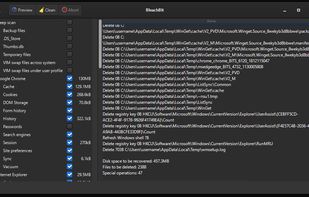
    BleachBit frees disk space and maintains privacy by quickly removing unnecessary files such as cache, cookies, browser history, temporary files, and system logs. It can also shred files and clean free disk space to prevent data recovery.

    Cost / License

    • Free
    • Open Source

    Application type

    Platforms

    • Windows
    • Linux
    • Flathub
    • Flatpak
    • AppImage
    BleachBit screenshot 1
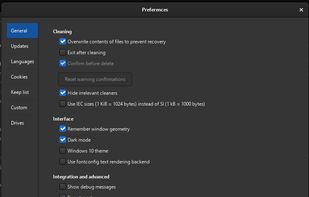
    BleachBit screenshot 2
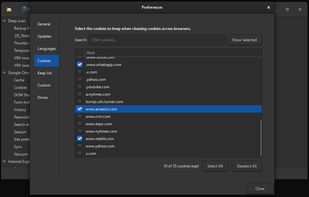
    BleachBit screenshot 3
    Darlene SonalderDarlene Sonalder’s note

    Similar to CCleaner icon CCleaner but with no crap !

  2. Graphical GNOME application that analyzes disk usage with detailed graphical representation, supporting scans of both local and remote directories.

    Cost / License

    • Free
    • Open Source

    Application type

    Platforms

    • Mac
    • Linux
    • BSD
    • FreeBSD
    • GNOME
    • Flathub
    • Homebrew
    Baobab Disk Usage Analyzer screenshot 1
    Baobab on Xubuntu
    Full scan, rings chart
    Full scan, treemap chart
    Darlene SonalderDarlene Sonalder’s note

    If your distro didn't come with a Disk Utility App install this one !

  3. CPU-X is a free software that gathers information on CPU, motherboard and more.

    Cost / License

    • Free
    • Open Source

    Platforms

    • Linux
    • BSD
    • Flathub
    CPU-X (by X0rg) screenshot 1
    CPU-X (by X0rg) screenshot 2
    +5
    CPU-X (by X0rg) screenshot 3
    Darlene SonalderDarlene Sonalder’s note

    Real time information on your CPU such as temp, etc...

  4. GParted icon
     Like

    Manage partitions with ease, supporting resizing, moving, and copying. Utilize GParted Live for cross-platform use on x86 machines.

    Cost / License

    • Free
    • Open Source

    Application type

    Platforms

    • Linux
    GParted screenshot 1
    GParted screenshot 2
    GParted Live boot menu.
    +1
    GParted screenshot 4
    Darlene SonalderDarlene Sonalder’s note

    Powerful disks and partitions manager for linux !

  5. Piper icon
     Like

    Piper is a graphical user interface to configure gaming mice. Configuration options include changing the resolution (DPI) of the mouse, adding and removing profiles, setting LED colors and changing button behaviors.

    Cost / License

    • Free
    • Open Source

    Application type

    Platforms

    • Linux
    • Flatpak
    Piper screenshot 1
    Piper screenshot 2
    Piper screenshot 3
    Piper screenshot 4
    Darlene SonalderDarlene Sonalder’s note

    If you want to configure your mouse.

  6. f.lux icon
     Like

    Software that makes the color of your computer's display adapt to the time of day, warm at night and like sunlight during the day.

    Cost / License

    • Free
    • Proprietary

    Application type

    Platforms

    • Windows
    • Mac
    f.lux screenshot 1
    Main Window
    Color Presets
    +5
    Color Effects
    Darlene SonalderDarlene Sonalder’s note

    If your PC or distro have no blue light filter integrated that's the way

  7. Desktop interface for managing virtual machines. It supports KVM, Xen, and Linux Containers, providing a summary of performance and resource stats.

    Cost / License

    • Free
    • Open Source

    Application type

    Platforms

    • Linux
    • BSD
    • Flathub
    • Flatpak
    virt-manager screenshot 1
    virt-manager screenshot 2
    virt-manager screenshot 3
    Darlene SonalderDarlene Sonalder’s note

    For easy Virtual Machine in linux

Page 3 of 3

Comments

Raposu
0

I would add Artix Linux into the list, it works perfectly, I use it with arch repos and aur and i never got big issues. Solus for beginners is also pretty nice And in your firefox mention you could add Zen browser too, which works like a charm!

RemovedUser
2

All distros use systemd under the threat of garbage that will check the age of users. However, I would like to try to share distros for this list that do not use systemd:

Devuan GNU+Linux MX Linux PCLinuxOS Redcore Linux

However, I do not rule out that the distributions listed by me will add garbage in the form of age verification.

2 replies
Darlene Sonalder
App tester and reviewer at Great App Testing Ltd.
Replying to @RemovedUser

Yeah systemd is somewhat problematic, I am not a fan of it but my OS unfortunately runs it. However I don't think because systemd has worked on an option to do age verification would result in 100% of linux OS using it requiring that option.

The other problem is that most of systemd-less distros are not suited for beginners (which are who the list is address for). You also could mention Void Linux icon Void Linux which is quite popular and do not use systemd.

hAmazing
Replying to @RemovedUser

What?? How can it check the age of users?

No Name
0

Kick out mozilla for librewolf, which now gives option to use containers and store cookies and site data.

1 reply
Raposu
Replying to @No Name

Librewolf breaks half of the web, it wouldn't work for people that don't like to tinkering