


Piper
10 likes
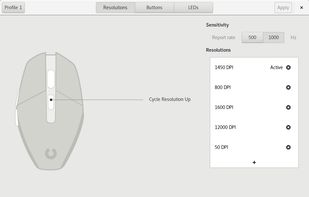
Piper is a graphical user interface to configure gaming mice. Configuration options include changing the resolution (DPI) of the mouse, adding and removing profiles, setting LED colors and changing button behaviors.

Cost / License
- Free
- Open Source (GPL-2.0)
Application typeApplication types
Platforms
- Linux
- Flatpak


Features
Piper News & Activities
Highlights All activities
Recent News
No news, maybe you know any news worth sharing?
Share a News Tip
Recent activities
Only works with some devices and it’s not clear why some are not is not all Steelseries implemented
 DonGeronimo7 added Piper as alternative to Mouse Control
- the_Libre_one liked Piper
- Paul added Mouse Remapping as a feature to Piper
- Alonso Herrera liked Piper
- miau liked Piper


Piper information
Developed by
libratbagLicensing
Open Source (GPL-2.0) and Free product.Written in
Alternatives
31 alternatives listedBadge
Get an embeddable badge for PiperSupported Languages

AlternativeTo Categories
OS & Utilities, Gaming Software, System & HardwareGitHub repository
- 6,010 Stars
- 226 Forks
- 225 Open Issues
- Updated

Featured in Lists


The linux setup for everyone (freeware with GUI only and distro recommendations)
THIS LIST HAS BEEN DELETED DUE TO A BUG, SO IT MISSES SOME HONORABLE MENTIONS !
I've been using Linux for a year now. I do use CLI tool and the terminal but I'm super used to GUI and I do understand why you might don't want to bother with Terminal and stuff ! Here is my list of useful tools for beginners on Linux !
The same list for
macOS :
Windows 10 :


netherquark's suite
This is just a list of the software products I use
Comments and Reviews
When I left Windows and moved to Linux, my Logitech G102 mouse was lined up in my drawer for a long time until I used Piper. It recognized the Logitech G102 without any problem. There are options to adjust the polling rate, DPI, and colors. Its design is not like the G-Hub program from Logitech it has a simple design and does not have a million options for color changing patterns, but it is more than enough. I often put a solid color and continue using it, but the most important thing (and this is what I did not know the first time I used it) the changes you make do not happen immediately like G-Hub. You must press the Apply button above on the right first. The nice thing is that it supports several mouses, including: 1-Logitech (the most supported) 2-Asus 3-Glorious 4-Steel Series 5-Mars Gaming 6-Nubwo 7-Etekcity 8-Roccat You can see the supported devices here : https://github.com/libratbag/libratbag/tree/master/data/devices
As I understand, you can add any mouse that meets several conditions, such as identifiers -or something like that- to this program if you understand programming, because Piper uses something called Openinput and Libratbag .. I am not a programmer and I do not understand programming. Correct me if I am wrong.
Only works with some devices and it’s not clear why some are not is not all Steelseries implemented