Apps with 'port monitoring' feature

All apps in Apps with 'port monitoring' feature category. Use the filters below to narrow down your search. 
Copy a direct link to this comment to your clipboard
  1. ViewPorts icon
     1 like

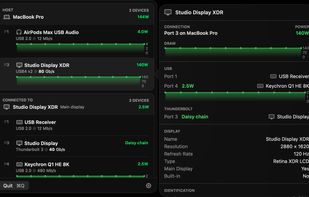
    A macOS menu bar utility that maps every port, device, and power draw on your Mac. Live topology, hub and daisy-chain support, and link speeds — all local, no telemetry.

    Cost / License

    • Paid
    • Proprietary

    Platforms

    • Mac
    • CA flagCanada
    ViewPorts screenshot 1
    7 alternatives
  2. devglow icon
     1 like

    devglow is a macOS menu bar app that replaces terminal tabs, pm2, and port killer utilities for local development. It lets you register any shell command — whether it's Next.js, Vite, Hugo, Rails, Flask, Cargo, Go, or Docker — and manage everything from a single interface.

    Cost / License

    • Paid
    • Proprietary

    Application type

    Platforms

    • Mac
    • KR flagSouth Korea
    devglow screenshot 1
    devglow screenshot 2
    53 alternatives
  3. portracker icon
     1 like

    A self-hosted, real-time port monitoring and discovery tool.

    Cost / License

    • Free
    • Open Source (MIT)

    Platforms

    • Self-Hosted
    • Docker
    • Windows
    • Linux
    • TrueNAS
    • Unraid
    • Synology C2
    • Ubuntu Server
    portracker screenshot 1
    12 alternatives
  4. Port Kill icon
     Like

    A lightweight macOS status bar app that monitors and manages development processes running on ports 2000-6000. The app provides real-time process detection and allows you to kill individual processes or all processes at once.

    Cost / License

    • Free
    • Open Source

    Platforms

    • Mac
    • US flagUnited States
    Port Kill screenshot 1
    10 alternatives
  5. Uptimia icon
     Like

    Uptimia monitors websites, APIs, servers, SSL certificates and domains from 171 locations worldwide. You get grouped alerts on the channels your team already uses, a public status page, and reports on availability and response time.

    Cost / License

    • Paid
    • Proprietary

    Application type

    Platforms

    • Online
    • DE flagGermany
    • European Union flagEU
    See every monitor at a glance. Filter by client or environment group, check availability, active incidents and scheduled maintenance, then jump straight to the monitors that are down right now.
    Status, host, group, uptime, response time and an uptime trend for every monitor. Filter by up, down, paused or suspended, or by monitor type, and act on several monitors at once.
    When several monitors fail together, Uptimia groups them into one incident and sends one digest alert. Acknowledging it pauses the escalation, and failures that are probably related are flagged so you find the shared cause faster.
    +2
    90-day uptime bars per component, live incident updates and scheduled maintenance. Visitors can subscribe, switch between UTC and local time, and pick a light or dark theme.
    23 alternatives