
devglow icon
devglow icon

devglow

devglow is a macOS menu bar app that replaces terminal tabs, pm2, and port killer utilities for local development. It lets you register any shell command — whether it's Next.js, Vite, Hugo, Rails, Flask, Cargo, Go, or Docker — and manage everything from a single interface.
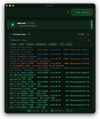
devglow screenshot 1
devglow screenshot 2

Cost / License

  • Pay once
  • Proprietary

Application type

Platforms

  • Mac
1like
0articles
Save

Features

Properties

Features

Highlights All activities

devglow News & Activities

Recent activities

devglow information

  • Developed by

    KR flagGRABA
  • Licensing

    Proprietary and Commercial product.
  • Pricing

    One time purchase (perpetual license) that costs $10.
  • Alternatives

    53 alternatives listed
  • Badge

    Get an embeddable badge for devglow
  • Supported Languages

    • English
devglow was added to AlternativeTo by Paul on and this page was last updated .

No comments or reviews, maybe you want to be first?

What is devglow?

devglow is a macOS menu bar app that replaces terminal tabs, pm2, and port killer utilities for local development. It lets you register any shell command — whether it's Next.js, Vite, Hugo, Rails, Flask, Cargo, Go, or Docker — and manage everything from a single interface. Start and stop processes with one click or keystroke, search through real-time logs with ?F, and detect port conflicts automatically. When a port is already in use, devglow shows you exactly which process is blocking it and lets you kill it in one click. It also ships with an MCP server, so AI coding tools like Claude Code and Cursor can start, stop, and monitor your processes directly.
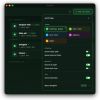
Command-centric. Not tied to any framework or runtime. Register a command, point it at a directory, and go. Ships with an MCP server for AI agents. If it runs in your terminal, it runs in devglow.

Features

  • MCP Integration: Claude Code, Cursor, and any MCP-compatible AI agent can start, stop, and monitor your processes directly.
  • Quick Launch: Press ?K to instantly find and start any process. Fuzzy search across all your registered commands.
  • Port Conflict Detection: See what process is blocking your port. Kill it with one click.
  • One-click start/stop for any process
  • Built-in log viewer with 5 MB ring buffer
  • Section grouping — running, registered, AI processes
  • Command-centric — any shell command works
  • Menu bar native — quick access, minimal footprint
