Apps tagged with 'Delete Old Files'

All apps in Apps tagged with 'Delete Old Files' category. Use the filters below to narrow down your search. 
Copy a direct link to this comment to your clipboard
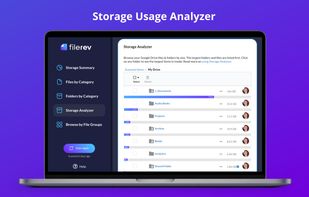
  1. The Ultimate Tool for Managing Google Drive: Duplicate File Remover for Google Drive, Organizer for Google Drive, View Folder Sizes in Google Drive, and more.

    Cost / License

    • Freemium (Subscription)
    • Proprietary

    Application type

    Since

    • Since 2020 (updated Oct 2026)

    Platforms

    • Windows
    • Mac
    • Linux
    • Chrome OS
    • Online
    • Software as a Service (SaaS)
    • iPhone
    • iPad
    • Android Tablet
    • Windows Mobile
    • Google Drive
    View your Storage Usage in Google Drive
    View files by type in Google Drive
    View folders by size in Google Drive
    +2
    Bulk Delete files in Google Drive
    78 alternatives
  2. EraseTemp icon
     6 likes

    EraseTemp will delete all those temporary files, that take up so much space on your PC. EraseTemp is also very useful, if you use a backup application, which makes only backups, never deletes older backup files until your hard disk is full.

    Cost / License

    • Free
    • Proprietary

    Application type

    Since

    • Since 2011

    Platforms

    • Windows
    Messages
    Command Line Arguments
    5 alternatives
  3. Delage32 icon
     6 likes

    DelAge32 is a very easy to use command line tool that deletes or moves files by age (number of days). This is very useful, if You use a backup application, which makes only backups, never deletes older backup files until your hard disk is full.

    Cost / License

    • Free
    • Proprietary

    Application type

    Since

    • Since 2009

    Platforms

    • Windows
    • DE flagGermany
    • European Union flagEU
    Delage32 deletes files, and optionally removes empty folders.
  4. Cyber-D's Autodelete can delete old files in a folder (and subfolders) you selected. Simply select the folder you wish to clean (downloads for example), set the rules (older than 30 days since created) and how to delete (move, recycle, secure delete).

    Cost / License

    • Free
    • Proprietary

    Application type

    Since

    • Since 2011

    Platforms

    • Windows
    3.09
    Cyber-D's AutoDelete screenshot 2