Apps tagged with 'File Comparison' Page 3 of 4

All apps in Apps tagged with 'File Comparison' category. Use the filters below to narrow down your search. 
Copy a direct link to this comment to your clipboard
  1. WinDiff icon
     3 likes

    WinDiff is a graphical file-comparison program published by Microsoft (from 1992[1]), and is distributed with certain versions of Microsoft Visual Studio as well as in source-code form with the Platform SDK code samples.

    Cost / License

    • Free
    • Proprietary

    Platforms

    • Windows
    WinDiff screenshot 1
    27 alternatives
  2. Exactfile icon
     3 likes

    A file integrity verification tool: Use it to make sure files copied to CD-ROM are bit-perfect copies, Use it to make sure backups copied from one drive to another are just right, Use it to make sure files haven’t been changed or damaged over time. Multi-threaded, so your extra C.

    Cost / License

    • Free
    • Proprietary

    Alerts

    • Discontinued

    Platforms

    • Windows
    Exactfile screenshot 1
  3.  3 likes

    Ediff is a comprehensive visual interface to Unix diff and patch utilities.

    Ediff provides a convenient way for simultaneous browsing through the differences between a pair (or a triple) of files or buffers (which are called ‘variants’ for our purposes). The files being compare.

    Cost / License

    • Free
    • Open Source

    Platforms

    • Windows
    • Linux
    44 alternatives
  4. DiffPlug icon
     2 likes

    DiffPlug is a free text editor/differ and image viewer/differ. Purchasing a license allows you to diff other kinds of files such as Simulink.

    Cost / License

    • Freemium
    • Proprietary

    Platforms

    • Mac
    • Windows
    • Linux
    DiffPlug screenshot 1
    60 alternatives
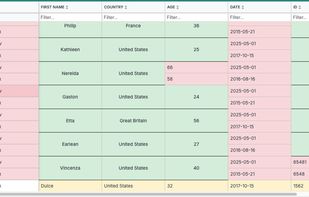
  5. "TableTextCompare" (TTC) is a small utility that provides easy comparison of two-tab-delimited or comma-delimited (csv) files, to determine the difference between the two files.

    Cost / License

    • Free
    • Proprietary

    Application type

    Platforms

    • Windows
    • Self-Hosted
    Sample comparison
    25 alternatives
  6. DeadHash icon
     1 like

    Calculate file hashes with ease thanks to an easy to use GUI, drag and drop functionality and help documentation that are all included!.

    Cost / License

    Platforms

    • Windows
    • Android
    DeadHash screenshot 1
    DeadHash screenshot 1
    DeadHash screenshot 2
    +10
    DeadHash screenshot 3
  7. Patchword icon
     1 like

    Compare text files or entire directory hierarchies, export and apply patches, and perform non-destructive find and replace operations on text files.

    Cost / License

    • Free
    • Proprietary

    Application type

    Platforms

    • Mac
    Patchword screenshot 1
    Patchword screenshot 1
    Patchword screenshot 2
    +2
    Patchword screenshot 3
    27 alternatives
  8. Diff Doc icon
     4 likes

    Compare Files Using ' Diff Doc' a visual file compare and folder compare utility that creates a detailed file diff. File comparison can optionally be done with the command line. Compare Word and Compare XLS files in addition to PDF, txt, rtf...

    Cost / License

    • Paid
    • Proprietary

    Platforms

    • Windows
    55 alternatives
  9. ECMerge icon
     2 likes

    ECMerge is a comparison and synchronization tool with two and three-way merge for text and folders and difference on binary, text, images and folders, locally, via FTP/S, SFTP or in version controls. For Windows, Mac OS X, Solaris and Linux.

    Cost / License

    • Paid
    • Proprietary

    Platforms

    • Mac
    • Windows
    • Linux
    3-way text and folder merge in ECMerge
    Text merge
    Folder merges
    +1
    Images comparison
    55 alternatives
  10. Workshare Compare is the leading document comparison software that lets you perform file comparison of two documents against multiple modified versions.

    Cost / License

    • Paid
    • Proprietary

    Application type

    Platforms

    • Windows
    59 alternatives
  11. Hogandiff icon
     1 like

    A free tool that compares two Excel files and highlights every changed cell, working out the row and column correspondences on its own — no key column or key row to configure.

    Cost / License

    • Free
    • Proprietary

    Application type

    Platforms

    • Windows
    • Mac
    The desktop app: pick the two workbooks to compare and press Run. Nothing else has to be set up.
    Comparison options: whether to account for inserted and deleted rows and columns, move detection, fuzzy name matching, and comparing by value or by formula.
    What you get back: both workbooks with the changed cells colored in — yellow for changed, red for rows and columns that exist on only one side, blue for moved — plus a report listing every difference.
    9 alternatives
  12. TheCommander is a native dual-panel file manager for macOS, inspired by the proven interface concept of classic file managers like Total Commander. The app is built entirely in Swift/SwiftUI and offers efficient, keyboard-driven file management.

    Cost / License

    • Free
    • Proprietary

    Application type

    Platforms

    • Mac
    The original theme
    Theme: Mint
    Theme: Ocean
    +8
    Theme: Synthwave
    13 alternatives
  13. This is a tool developed by a small team in the Netherlands. It's a standalone application that generates a simple, concise, easy to understand overview of the differences between 2 Excel sheets. It can also handle even the most complex Excel files.

    Cost / License

    • Paid
    • Proprietary

    Platforms

    • Windows
    PerfectXL Compare screenshot 1
    PerfectXL Compare screenshot 1
    PerfectXL Compare screenshot 2
    +1
    PerfectXL Compare screenshot 3
    12 alternatives
  14. A file and folder comparison tool, targeted at developers, with powerful merging capabilities. Easily integrate with git or other version control system and diff and merge files with the 3-ways merge and powerful alignment...

    Cost / License

    • Paid
    • Proprietary

    Platforms

    • Windows
    No Compare screenshot 1
    No Compare screenshot 1
    No Compare screenshot 2
    +1
    No Compare screenshot 3
    20 alternatives
  15. DiffALL icon
     Like

    DiffALL compares any two media files and pinpoints every difference. Upload expected and actual — video, audio, images, subtitles (SRT/VTT), or text/JSON — and get a similarity score in seconds.

    Cost / License

    • Freemium
    • Proprietary

    Application type

    Platforms

    • Online
    Main comparing page
    Finding A live differences between videos
    Finding A live differences between videos - side by side.
Expected vs Actual
    51 alternatives