


Zed Editor
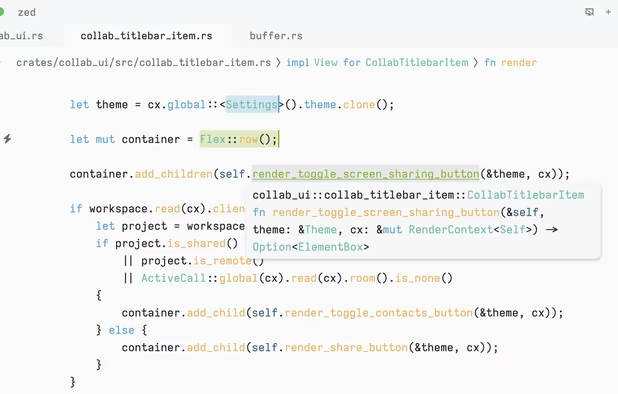
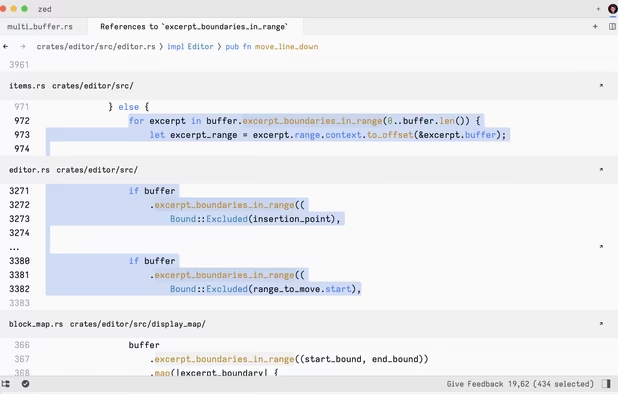
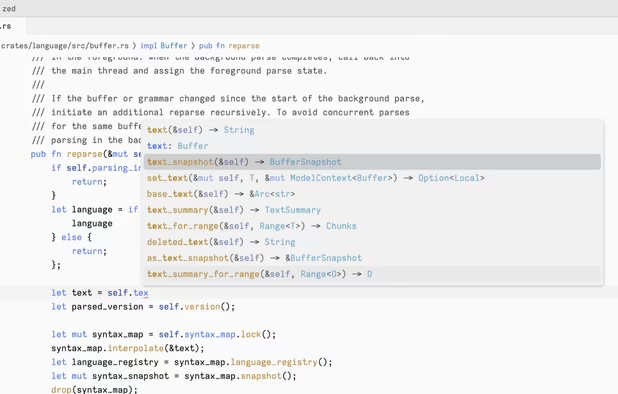
Blazing fast code editor offering real-time multi-user collaboration, language-aware syntax highlighting, integrated terminal, multi-buffers for tab-free editing, built-in Vim mode, searchable outline, AI coding assistance, advanced keyboard commands, and cross-platform support.
Cost / License
- Freemium (Subscription)
- Open Source
Application types
Platforms
- Mac
- Windows
- Linux
- Flathub
- Flatpak

Features
Properties
- Lightweight
- Optimal performance
- Support for Themes
- Distraction-free
- Keyboard focused
Features
- Syntax Highlighting
- Dark Mode
- Built-in terminal emulation
- Autocompletion
- No registration required
- Works Offline
- Rust
 Git Support
- Ad-free
- Extensible by Plugins/Extensions
- Multiple Cursors
- Real time collaboration
- Team Collaboration
- Built-in AI Assistant
- Fuzzy Finder
- Support for MarkDown
- Code Formatting
- Command palette
- AI-Powered
- Refactoring
- File Versioning
- No Tracking
- Full-Text Search
Zed Editor News & Activities
Recent News
- Fla published news article about Zed Editor
 Zed introduces free Student plan with Pro features for university students
Zed has launched a new Student plan, offering currently enrolled university students free access to...
- Fla published news article about GitHub Copilot
 GitHub Copilot now available in Zed for all paid subscribers
GitHub Copilot is now officially supported in the Zed code editor, allowing integration for all pai...
- POX published news article about Zed Editor
 Split diffs are now available in Zed as the new default, replacing unified diffs
Zed, the high-performance code editor from the creators of Atom, now defaults to split diff view wi...


Recent activities
 lucascmeyer added Zed Editor as alternative to Ollie IDE
 futile added Zed Editor as alternative to opencode
- mogumo liked Zed Editor
 fileshot-adm added Zed Editor as alternative to guIDE - Local LLM IDE
- connorslade liked Zed Editor
 HappyGamerGoose added Zed Editor as alternative to Amp Code
- dnylanderos liked Zed Editor


Featured in Lists

The ultimate list of apps/services for better Security, Privacy & Anonymity; Defense against Surveillance. What …

There is no doubt that Adobe Suite is great, even in some case it's probably the best. But you can be mad …

## THIS LIST HAS BEEN DELETED DUE TO A BUG, SO IT MISSES SOME HONORABLE MENTIONS ! This is the apps for macOS that I …
What is Zed Editor?
Zed is a blazing fast, multi-user, productivity-focused text editor. From the creators of  Atom,
Atom,  Electron and Tree-sitter, the editor features built-in Vim mode with tooltips for key-bindings, language-aware syntax tree enabling precise code highlighting and searchable outline, integrated terminal and innovative multi-buffers for fast and efficient editing across files without switching tabs.
Zed Editor information
Developed by
 Zed Industries
 Licensing
Open Source and Freemium product.Pricing
Subscription that costs from $20 per month + free version with limited functionality.Written in
Rating
Average rating of 4.6Alternatives
94 alternatives listedNews
25 news article related to Zed EditorSupported Languages
- English

AlternativeTo Categories
Development, Office & Productivity, OS & Utilities, Remote Work & Education, AI Tools & ServicesGitHub repository
- 77,937 Stars
- 7,571 Forks
- 3174 Open Issues
- Updated


Comments and Reviews
Super fast on my old Laptop and AI features are not really annoying, like in other IDEs.
It works fast, has a good vim-like mode, BUT it's a text editor without UTF-16 and other code pages. I did a mistake and associated all text files with ZED, and I cannot open files from Samsung phone. MacOS preinstalled TextEdit can open files with different encodings, it can Windows Notepad, as can VS code, Geany, etc, but can't do Zed
Its fast and the AI features are optional and can be 100% turned of
Good bye VSCode/Chrome
best IDE I have ever tried. It starts faster than VScodium on my PC.
Poses no competition to VS Code. Very unoptimized and requires hardware acceleration for UI. Absolutely unusable slideshow without it. UI itself is too monotonous. Everything blends in together. No any color or icons. So as marketplace. Code completion is practically non-existent. At least C++. Very limited set of supported languages. Out of box and with marketplace, which also has very few languages. Only 53 language extension, of which most aren't programming languages. No Pascal support in any form. I understand it's just developing, but it has been widely advertised as some real alternative to VS Code, but it's not close. Not even in the same ballpark. And there are many similar editors with similar to Zed functionality.
Fast and easily customizable. I've been searching for VSCodium alternatives for years because it was my only remaining Microsoft product in use. Never found one that came close to its remarkably convenient shortcuts / key mappings until I stumbled upon Zed. It doesn't support all the shortcuts yet, but the few that it doesn't I easily replaced with simple AutoKey scripts, i.e.,"Emmet: wrap with abbreviation" [to simply wrap with a HTML tag], or commenting a selection.
I have no idea how many stars to give as I'm eagerly awaiting the release of the Windows version. Nevertheless, it has the potential of being a drop-in replacement for Sublime Text or VSCode/ium as it is extensible and has support for different coding environments (running Python code, command line tools, etc). It also has the added benefit of being open source.