
XPI CRM icon
XPI CRM icon

XPI CRM

 Like

XPI CRM is a customer success CRM built for SaaS teams who manage a book of business. It brings everything about a client into one place: a health score with the signals behind it, renewals, ARR and expansion, tickets with SLA rules, tasks, conversations, meetings and playbooks.
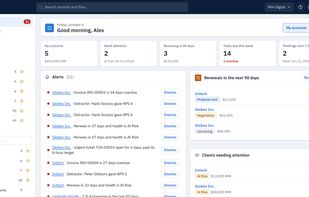
My day: what needs your attention today

Cost / License

  • Freemium (Subscription)
  • Proprietary

Application type

Since

  • New

Platforms

  • Online
  • Software as a Service (SaaS)
0likes
0articles
Save

Features

Properties

Features

Highlights All activities

XPI CRM News & Activities

Recent activities

XPI CRM information

XPI CRM was added to AlternativeTo by Adrian-Poaca on and this page was last updated .

No comments or reviews, maybe you want to be first?

What is XPI CRM?

XPI CRM is a customer success CRM built for SaaS teams who manage a book of business. It brings everything about a client into one place: a health score with the signals behind it, renewals, ARR and expansion, tickets with SLA rules, tasks, conversations, meetings and playbooks.

Each day starts from My day, a single page with the renewals, tasks, tickets and at-risk clients that need attention. Teams can add their own objects, fields, picklists, page layouts and saved views without code, import clients and contacts from CSV, and report on ARR movement and usage.

XPI CRM includes a built-in AI assistant, an API and webhooks, and a connector for working with your data from Claude or ChatGPT.

The free plan includes every feature for up to 1,000 entries (clients, contacts and your own records), with no credit card needed. An Enterprise plan is available for larger teams.

Beyond customer success: XPI CRM's objects, formulas, views and playbooks fit other ways of working too. Examples: quoting for manufacturers (price rules, quote approval, 3D product previews as an Enterprise build) and trip planning for transport companies (planning board, driver leave, fleet map and a delay warning with EU driving rules). See xpicrm.com/use-cases.