
WinSend icon
WinSend icon

WinSend

AirDrop-like file transfer for Windows — send clipboard text and photos from iPhone to PC over local Wi-Fi, no cables, no cloud.
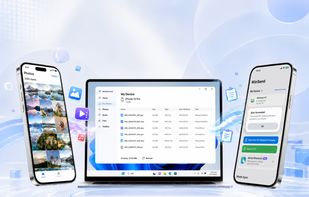
 Send clipboard text and photos between iPhone and Windows instantly over local Wi-Fi — no cables, nocloud, no account.

Cost / License

  • Freemium (Pay once)
  • Proprietary

Platforms

  • Windows
  • iPhone
0likes
0comments
0articles

Features

Properties

  1.  Lightweight
  2.  Privacy focused

Features

  1.  Ad-free
  2.  No Tracking
  3.  Dark Mode
  4.  Works Offline
  5.  No registration required
  6.  Peer-To-Peer
  7.  Large File Transfer

WinSend News & Activities

Highlights All activities

Recent activities

WinSend information

  • Developed by

    CN flagyanlong chen
  • Licensing

    Proprietary and Freemium product.
  • Pricing

    One time purchase (perpetual license) that costs $13 + free version with limited functionality.
  • Alternatives

    5 alternatives listed
  • Supported Languages

    • English
    • Chinese
    • Japanese

AlternativeTo Categories

File SharingOffice & Productivity

Apple AppStore

  •   Updated 
  •   0 avg rating
View in AppStore
WinSend was added to AlternativeTo by Terk on and this page was last updated .
No comments or reviews, maybe you want to be first?

What is WinSend?

AirDrop-like transfer for Windows. Quickly send text and photos from your iPhone to your PC — no cables, no cloud.

No account. No setup. Just connect to the same Wi-Fi and start instantly. Trigger sync from anywhere using Shortcuts or Back Tap — no need to open the app.

Key Features

• Clipboard Sync Copy on iPhone, paste directly on Windows.

• Fast Photo Transfer Send images instantly over local Wi-Fi. Your data stays on your network.

• Shortcuts & Back Tap Trigger sync without opening the app. One tap, done.

How It Works Install WinSend on both iPhone and Windows Connect to the same Wi-Fi network Pair automatically and start using

WinSend Videos

Show 1 more video

Official Links
