


File Explorer
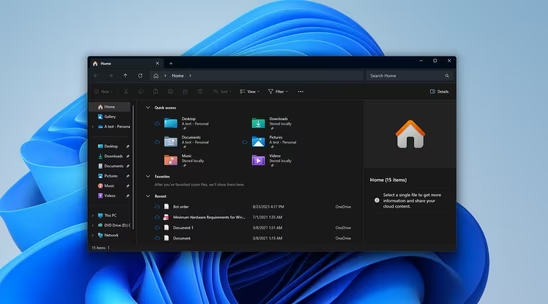
Manage your files using a graphical interface with offline capabilities, no registration, zip support, and a lightweight design. Enjoy features like dark mode and ad-free usage on Windows. Known as Explorer, it helps present the taskbar and desktop elements since Windows 95.


Features
Properties
- Lightweight
Features
- Windows Compatible
- Built-in Image viewer
- Ad-free
- Bundled with Windows
- No registration required
- Dark Mode
- Supports Zip files
- Works Offline
- Tabbed interface
- File Compression
- Disc Burner
- Graphical User Interface
- File Search
- Virtual Disk
- File Storage
- File Renaming
- Folder Size
File Explorer News & Activities
Recent News
- Maoholguin published news article about Files
 Files 4.0.20 adds archive extraction upgrades and improved operation feedback
The free open-source Files app has launched version 4.0.20, introducing several improvements especi...
- POX published news article about Windows 11
 Microsoft is testing background preloading of the File Explorer to speed up Windows 11
Microsoft has released Windows 11 Insider Preview Build 26220.7271 to the Dev and Beta channels. Th...
- Maoholguin published news article about Windows 11
 Windows 11 adds AI in Settings, a new Start Menu and AI-powered search in Photos & Search
Microsoft has unveiled a wide-ranging update for Windows 11 and Copilot+ PCs, introducing what it d...


Recent activities
 Lumibear added File Explorer as alternative to SPAN Finder
 POX added File Explorer as alternative to Captain's Deck
 insfactory added File Explorer as alternative to MTF Explorer
 Carlton2001 added File Explorer as alternative to Oxyde
 POX added File Explorer as alternative to Trove File Explorer
- kamoltuk2001 liked File Explorer
 POX added File Explorer as alternative to CoverFlowFinder
- kramermillay liked File Explorer
 gwrvan-barre added File Explorer as alternative to FolderFresh
 npn99f8hmj added File Explorer as alternative to Synapse file manager


Featured in Lists

Master List of all Apps and Software I use for both work and personal life.

Useful apps for Windows Additional resources: [https://www.softpedia.com/](https://www.softpedia.com/)

A list with 328 apps by christineconnor without a description.
What is File Explorer?
File Explorer is a file manager application that is included with releases of the Microsoft Windows operating system from Windows 95 onwards. It is sometimes referred to as the Windows shell, explorer.exe, or simply "Explorer".
It provides a graphical user interface for accessing the file systems. It is also the component of the operating system that presents many user interface items on the monitor such as the taskbar and desktop.
Controlling the computer is possible without Windows Explorer running (for example, the File | Run command in Task Manager on NT-derived versions of Windows will function without it, as will commands typed in a command prompt window).
File Explorer information
Developed by
 Microsoft
 Licensing
Proprietary and Free product.Rating
Average rating of 2.5Alternatives
133 alternatives listedNews
7 news article related to File ExplorerSupported Languages
- English
- Spanish
- German
- Italian


Comments and Reviews
The built-in file manager has been improved in a number of ways with the release of Windows 8 and Windows 10. The keyboard shortcut for creating folders is especially useful (CTRL+SHIFT+N), cannot believe it took this long! File transfers have also been outperforming stand-alone utilities and the UI gives a nice bit of detailed information. The user interface overall is much more streamlined and doesn't show information you don't need, which makes it easy to focus on your current task.
I still need additional software for things like advanced renaming and checksummed file transfers, features I only occasionally use.
Also wish Clover would work properly in order to get tabs back, alternatives don't seem to be as polished.
Imagine not being able to scroll while dragging files. Imagine not being able to create a folder based on the files you've selected. Imagine not being able to see multiple directories side by side. Imagine not being able to set folder specific views. Imagine not being able to add tags and colors to your folders/files. Imagine a slow, inaccurate search field that hasn't changed in a decade. File explorer is behind both linux's and MacOSX (especially macs) file explorers. Basically hasn't changed in over 20 years and it's depressing.
This is peak Microsoft
Behind all Linux apps? You're ridiculous.
it is lmao file explorer is trash compered to linux file manger
It only tells that you don't know how bad Linux managers are... Can you name that manager?
File Explorer is baked into explorer.exe, which is the main process that allows for desktop icons, the taskbar, the desktop wallpaper, and this file manager to function. There's no use trying to edit that process as that will merely break your Windows computer in an instant. Especially considering that applications call forth File Explorer when it comes to opening, saving, or uploading files, you basically can't replace it. I honestly can't see myself installing another file manager to use instead of this, as it'll just waste space; I'd like to be proven wrong, however.
At least on the bright side, it works, that's for sure. And it finally has tabs (since April 2022). (That's why it's 3 stars and not 1 of course...)
mix of basic and trash
Okay mix of image viewer, disk usage utility and file manager. They had some questionable moves lately.
It has many good features but few developers outside Microsoft know how to utilize them.
It's mostly great, but when they replaced "Favorites" with "Quick Access" in the side navbar, they ruined it. Now all my carefully-organized shortcuts are gone, replaced with a much less functional disorganized list with unusable link titles.
I have 8 folders pinned, all of which are named "2019". What am I supposed to do with that? It doesn't even show you the full file path when you hover over them.
slow slow slow until windows 10 1809 then ... bug bug bug ... i think it would be fixed in 1903 or any later versions, before it, i choose those "commanders"...