
WhaleWall icon
WhaleWall icon

WhaleWall

 1 like

Firewall tool for monitoring, controlling, and alerting on outgoing network connections, with real-time user notifications and customizable rule-based access control.
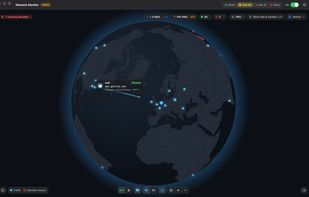
3D Traffic Overview

Cost / License

  • Freemium (Pay once)
  • Proprietary

Application type

Platforms

  • Mac
1like
0articles
Save

Features

Properties

Features

Highlights All activities

WhaleWall News & Activities

Recent activities

WhaleWall information

  • Developed by

    NL flagDriftbit44 Software
  • Licensing

    Proprietary and Freemium product.
  • Pricing

    One time purchase (perpetual license) that costs $39 + free version with limited functionality.
  • Alternatives

    23 alternatives listed
  • Badge

    Get an embeddable badge for WhaleWall
  • Supported Languages

    • English
    • French
    • German
    • Spanish
WhaleWall was added to AlternativeTo by cookienl on and this page was last updated .

No comments or reviews, maybe you want to be first?

What is WhaleWall?

WhaleWall is a macOS firewall and network monitor that controls app connections and shows network activity in real time. It displays connections on an interactive world map in 2D or 3D, including destinations, ports, protocols, and server locations. Users can allow or block individual apps, hosts, IP addresses, countries, or entire continents.

The software can use local or cloud AI models to decide if a connection should be allowed or blocked. The software offers Allow, Ask and Deny modes for connections not covered by existing rules. Ask Me displays connection alerts, while Ask AI uses an optional local model or ChatGPT or Claude to make decisions and save editable rules. WhaleWall supports automatically updated blocklists to block ads, trackers, and malware across apps, alongside encrypted DNS. Profiles provide different rule sets and can switch automatically when users change networks.

Menu bar controls, macOS widgets, and Control Center integration provide quick access to protection and activity. Optional local traffic history retains up to 12 months of connections, with timeline replay and CSV export. A command-line tool, monitoring metrics, and a read-only MCP server support automation and AI-assisted traffic analysis. The app offers support for CLI and OpenTelemetry.

Traffic history and rules stay on the Mac, and the app collects no telemetry. Cloud AI is optional and sends selected connection details to the chosen provider. Some features require WhaleWall Pro. The cloud AI functionalities require an additional AI subscription that is not included in the product.

