
Vortex by Artem Pronenko icon

Vortex by Artem Pronenko

 1 like

Free, open-source MacBook notch app with a focus timer, clipboard history, a file shelf that catches new builds, screen-to-task capture with OCR, and keys Claude Code can use without seeing them.
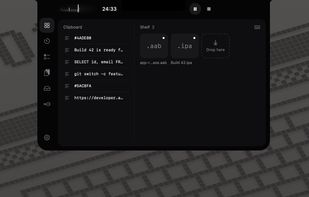
Home: the timer next to the notch, the clipboard and the shelf

Cost / License

  • Free
  • Open Source (MIT)

Since

  • New

Releases

  • 5 releases last year5 last year

GitHub

  • GitHub stars: 13

Platforms

  • Mac
1like
0articles
Save

Features

Properties

Features

Highlights All activities

Vortex by Artem Pronenko News & Activities

Recent activities

Vortex by Artem Pronenko information

AlternativeTo Category

OS & Utilities

GitHub repository

  •  13 Stars
  •  0 Forks
  •  0 Open Issues
  •   Updated  
View on GitHub
Vortex by Artem Pronenko was added to AlternativeTo by OrtexIsArtem on and this page was last updated .

No comments or reviews, maybe you want to be first?

Official Links

What is Vortex by Artem Pronenko?

Vortex lives in your MacBook's notch, or in the menu bar on a Mac without one. Hover over the notch and it opens with the tools you reach for a dozen times a day.

  • Timer: set the minutes on a drum and watch the countdown in the notch.
  • Clipboard: your last copies plus pinned ones: text, links, images and files.
  • Shelf: put files aside and drag them out later. It also catches new builds (.ipa, .apk, .aab) from folders you choose.
  • Tasks: freeze the screen, frame an area and press Return. You get a task with the screenshot, its recognized text (on-device OCR) and the page address from your browser.
  • Keys for Claude Code: keep database URLs, API tokens and passwords in the macOS keychain. Claude Code runs commands with {{key}} placeholders through a local MCP server and never sees a value.
  • Keyboard cleaning: lock every key while you wipe the keyboard.

Vortex works fully offline: no account, no analytics, no update checks. It is MIT-licensed, written in native Swift, speaks English and Ukrainian, and runs on macOS 14+ with Apple silicon.
