

Volume Scroller for YouTube icon

Volume Scroller for YouTube

 1 like

Volume Scroller for YouTube is a free browser extension by Zenso Digital that puts YouTube volume on your mouse wheel. Hover over a player and scroll up or down to change the level. A small indicator shows the new volume, and normal page scrolling returns as soon as the cursor...
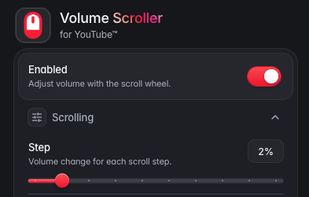
Volume Scroller settings popup: step size, modifier key, reverse direction, embedded players, remember volume, indicator, and theme.

Cost / License

  • Free
  • Proprietary

Application type

Since

  • New

Platforms

  • Google Chrome
  • Mozilla Firefox
  • Microsoft Edge  Install from the Chrome Web Store.
  • Opera
  • Brave  Install from the Chrome Web Store.
  • Chromium
1like
0articles
Save

Features

Properties

Features

Highlights All activities

Volume Scroller for YouTube News & Activities

Recent activities

Volume Scroller for YouTube information

Volume Scroller for YouTube was added to AlternativeTo by hey0x on and this page was last updated .

No comments or reviews, maybe you want to be first?

What is Volume Scroller for YouTube?

Volume Scroller for YouTube is a free browser extension by Zenso Digital that puts YouTube volume on your mouse wheel. Hover over a player and scroll up or down to change the level. A small indicator shows the new volume, and normal page scrolling returns as soon as the cursor leaves the player.

It works on regular watch pages, Shorts, YouTube Music, and YouTube players embedded on other websites. The popup lets you choose a step between 1% and 10% per scroll notch, require a modifier such as Alt, Ctrl, Shift, or the right mouse button, reverse the scroll direction, pick a horizontal, vertical, or hidden indicator, and optionally remember your volume between sessions.

The fine step size is useful if YouTube's 5% keyboard steps are too coarse at low listening levels. The extension does not boost volume past 100%, needs no account, and has no extension telemetry. It is available for Chrome and Chromium browsers such as Edge, Brave, and Opera through the Chrome Web Store, and for Firefox through Mozilla Add-ons.