

Vitool icon
Vitool icon

Vitool

 Like

Windows app to download, cut, convert and edit videos – built on yt-dlp and FFmpeg. Censor areas with keyframes, mask objects with AI (SAM 2) and transcribe with Whisper and speaker detection. Everything runs locally on your PC.
Vitool screenshot 1

Cost / License

Application type

Since

  • New

Updated

  • Updated Nov 2026

Platforms

  • Windows
0likes
0articles
Save

Features

Properties

Features

Highlights All activities

Vitool News & Activities

Recent activities

Vitool information

AlternativeTo Category

Video & Movies

GitHub repository

  •  5 Stars
  •  1 Fork
  •  0 Open Issues
  •   Updated  
View on GitHub

Popular alternatives

View all
Vitool was added to AlternativeTo by Bioheater on and this page was last updated .

No comments or reviews, maybe you want to be first?

Official Links

What is Vitool?

Vitool is a free and open-source video toolbox for Windows that combines several everyday video tasks in one app. Everything runs locally on your PC, nothing is uploaded.

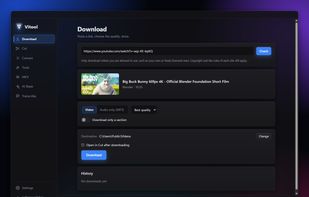
Download: paste a link from YouTube and many other sites (powered by yt-dlp), choose the quality or audio only, download single sections or whole playlists. If a site isn't supported, Vitool can open the page and pick up the video while it plays. yt-dlp is kept up to date automatically.

Cut and convert: lossless or frame-exact cuts, several sections at once. Convert to MP4, MKV, WebM, MP3, WAV and more, or to a target file size.

Tools: create GIFs, save still images, extract audio, burn in subtitles, and censor areas with blur, pixelation or black boxes that follow keyframes.

MKV: remove, add or rename audio and subtitle tracks without re-encoding. Align a dub with the original automatically, including PAL speed correction, and match the volume of audio tracks.

Optional add-ons: AI mask (SAM 2.1) to track an object and blur or cut it out, and transcription with Whisper, speaker detection and subtitle export.

Available in English and German. Licensed under AGPL-3.0.