Unisic is a ShareX-style screenshot and screen-recording tool built natively for Linux Wayland, with first-class support for KDE Plasma/KWin and portable fallbacks via xdg-desktop-portal for GNOME, niri, and other compositors.
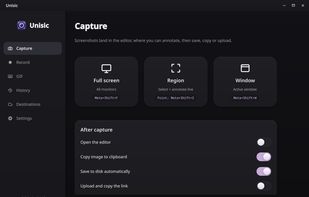
Capture full screen (multi-monitor), an interactive region with live dimension readout, or a specific window — using only legitimate Wayland paths (xdg-desktop-portal, KWin ScreenShot2, PipeWire), no X11 hacks. Annotate directly on the selection overlay before the capture is finalized, or in the full post-capture editor: arrows, lines, rectangles, ellipses, freehand, text, blur/pixelate, crop, numbered step markers, highlight, and undo/redo.
Every capture runs an independent after-capture pipeline — copy to clipboard, save to disk, open in the editor, and upload — all firing at once. Upload destinations are fully modular (custom HTTP/FTP/SFTP/API, ShareX-like .sxcu config) with auto-copy of the result URL and upload history.
Record your screen as GIF or video (MP4/WebM) from a region, full screen, or a single window, with configurable FPS, area, and duration. GIF export goes through ffmpeg with two-pass palette generation for clean output.
Extras: system tray with quick menu, fully configurable global hotkeys per capture mode (KGlobalAccel on KDE, portal GlobalShortcuts elsewhere), capture history with thumbnails, floating capture preview, optional OCR / QR-barcode decoding of a selected region, sound cues, and a custom SwiftUI-inspired Qt Quick interface. Localized in English, Polish, Spanish, and Italian.
Built with C++17 and Qt 6 / Qt Quick. Free and open source.





 EU
EU




 unisic


No comments or reviews, maybe you want to be first?