
Uncapped for Mac icon

Uncapped for Mac

 Like

Uncapped is a lightweight, native macOS utility that turns your keyboard, mouse and trackpad into one consistent set of shortcuts.
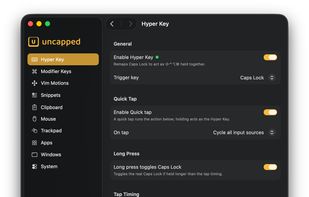
Hyper Key: hold Caps Lock for Shift+Control+Option+Command, tap it to switch input source, or long-press for real Caps Lock.

Cost / License

  • Pay once
  • Proprietary

Application type

Platforms

  • Mac
0likes
0articles
Save

Features

Properties

Features

Highlights All activities

Uncapped for Mac News & Activities

Recent activities

Uncapped for Mac information

Uncapped for Mac was added to AlternativeTo by irish_sonas on and this page was last updated .

No comments or reviews, maybe you want to be first?

What is Uncapped for Mac?

Uncapped is a lightweight, native macOS utility that turns your keyboard, mouse and trackpad into one consistent set of shortcuts.

What it does:

  • Hyper Key: hold Caps Lock (or any key you choose) to press Shift+Control+Option+Command at once, a combination no other app uses, so your shortcuts never clash. A quick tap can send Escape, switch input source or toggle Caps Lock instead.
  • Meh and Phew keys: two more chord keys, Command+Option+Shift and Control+Command+Shift, each on a key you pick.
  • Vim motions: hold the Hyper Key and H/J/K/L become arrow keys in every app.
  • Window management: snap windows to halves, quarters, centre or full screen, per display.
  • App shortcuts: one key combination launches an app, or jumps to it if it's already open.
  • System commands: sleep, lock, empty the Trash, change the volume, toggle dark mode, and more.
  • Snippets: type a short keyword and it expands into any text, with placeholders for the date, the clipboard and the cursor position. It never expands in password fields.
  • Clipboard: strip formatting automatically when you copy, and keep a private, expiring clipboard history that never leaves your Mac.
  • Mouse buttons: remap middle and side buttons, including extra buttons on Logitech mice, to shortcuts, window actions, system commands or gestures, with modifier and movement combos.
  • Trackpad gestures: trigger Mission Control, switch Spaces or swipe between pages from the keyboard.
  • iCloud sync: shortcuts, snippets and settings stay the same on all your Macs.
  • Stats: a private, on-device summary of the actions you use most.

One-time purchase with a 14-day free trial that includes every feature.

