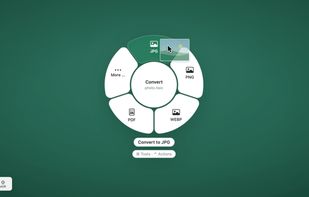
twistel is a free, open-source menu bar app for macOS. Drag files in the Finder, hold a key, and a ring appears around the pointer. Drop the files on an option and the result appears as a new file next to the original.
Shift opens the Convert ring with 314 conversions between images, audio, video, documents, spreadsheets, presentations, subtitles and archives. Command opens the Tools ring with 42 tools, among them compress, crop, resize, redact, sign and compare PDFs, recognize text (OCR), read QR codes, transcribe audio and video, remove audio, trim and join videos. Control opens the Actions ring: show in Finder, copy, copy path, pin in a floating window, move, AirDrop and share.
Other tools: add a PDF password (AES-256), watermark, page numbers, organize, split and merge PDF pages, archive as PDF/A, extract images, edit or strip metadata (EXIF/GPS), cut out the subject of a photo, edit photos, make collages, burn in subtitles, change video speed, split videos, save video frames, normalize volume, trim audio and convert audio to stereo or mono.
Crop, rotate and compress open a fan of presets next to the item, for example 16:9, 90 degrees or under 5 MB, so common jobs need no window. With a mouse, scrolling switches between rings.
Everything runs on your Mac. The app contains no networking code, which is checked on every release, and optional helper programs such as FFmpeg, LibreOffice or whisper.cpp run in a sandbox without internet access. There is no account and no telemetry.
Requires macOS 26 and Apple silicon. The app is not notarized, so the first launch needs "Open Anyway" in System Settings.












No comments or reviews, maybe you want to be first?