




TSS EcoScreen
1 like
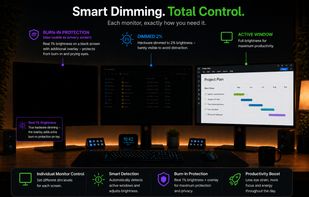
Adaptive per-monitor brightness manager for Windows that automatically dims inactive displays, with two-stage dimming, burn-in protection, break reminders, and energy usage statistics.

Cost / License
- Pay once or Subscription
- Proprietary
 EU
EUPlatforms
- Windows


Features
TSS EcoScreen News & Activities
Highlights All activities
Recent activities
 Mark added TSS EcoScreen as alternative to DispCtrl
 Shin-Chan added TSS EcoScreen as alternative to LiteBright
- Toni Leipold liked TSS EcoScreen
- Toni Leipold added TSS EcoScreen
- Mauricio B. Holguin updated TSS EcoScreen
 Toni Leipold added TSS EcoScreen as alternative to Twinkle Tray, Monitorian, Dimmer, PangoBright and 1 more


TSS EcoScreen information
Developed by
 TSS - Toni Leipold
 Licensing
Proprietary and Commercial product.Pricing
One time purchase ranging between $5 and $6, and / or subscription ranging between $1 and $2 per month.Alternatives
7 alternatives listedBadge
Get an embeddable badge for TSS EcoScreenSupported Languages


No comments or reviews, maybe you want to be first?