What you can do
Your animations
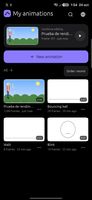
Trazo opens on a gallery of your animations, each with a picture of its first frame and its length.
Continue editing takes you back to the exact frame where you left off.
Search, sort by date or name, and rename, duplicate, export or delete from each animation's menu.
Earlier versions: a copy is kept every 10 minutes, so you can go back if something goes wrong.
Three examples to learn from: a bouncing ball, a blink and a walk cycle.
Draw
24 brushes: pencils, ink, markers, paint, airbrush and textures. Each one shows a preview of its stroke and responds to pressure.
Custom brushes: duplicate and tweak them, and import or export .animbrush files. PNG images can be used as brush tips.
Stabilizer, symmetry, shapes (line, rectangle and ellipse), gap-closing fill, eyedropper, and rectangle, lasso and magic-wand selection to move, scale and rotate.
Text tool, and fill on every drawing of a layer at once.
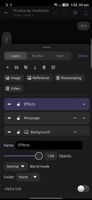
Layers with opacity, 5 blend modes, clipping masks, alpha lock and fixed background layers. Group layers in folders, and use guide layers for sketches that never show up in the export.
Animate
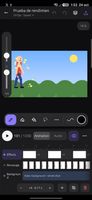
A timeline with one track per layer, so each layer keeps its own timing. Drag the edge of a drawing to make it last longer or shorter; a bubble shows the length in frames and seconds. A background can hold for the whole shot while the character changes every two frames.
Thumbnails, pinch-to-zoom, per-layer onion skin, playback range, loop and ping-pong.
Reorder by dragging, copy and paste frames, and select several at once.
In-betweens: generate the drawings between two frames, moving, scaling and rotating.
Record motion: drag a selection while the animation plays and Trazo makes one drawing per frame.
Camera: set a start and end framing with zoom and rotation; it is applied when playing and exporting.
Rotoscoping: import a video or GIF as a reference layer, with a grey or blue tint for tracing. The layer creates the frames for you and is left out of the exported result.
Sound
Sound lives in the timeline, under your layers: each sound track shows its waveform.
Move and trim clips by dragging, change the volume, cut at the current frame, mute, add fades, normalize or split into phrases — without leaving the timeline.
Several tracks mixed together; supports WAV, MP3, OGG, FLAC and M4A.
Record voice-over on top of the animation, with countdown and pre-roll.
Lip-sync with scrubbing, markers and phonemes.
Export and share
Presets for TikTok / Reels (9:16), Instagram (4:5), square, YouTube (16:9) and GIF for WhatsApp.
Formats:
MP4 with H.264 and AAC, using the phone's hardware encoder (and Media Foundation on Windows).
GIF, PNG and PNG sequence.
AVI and WAV.
Share straight from the app.









 Neon pop added Trazo as alternative to Blender, Krita, Synfig Studio, Adobe After Effects and 45 more


No comments or reviews, maybe you want to be first?