





Tracebar
6 likes
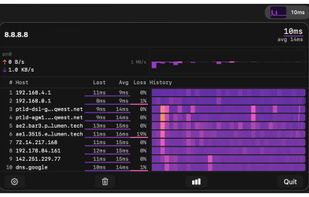
TraceBar puts a live traceroute in your macOS menubar. It continuously monitors the network path to any host, showing every hop’s latency, packet loss, and route changes in real time.

Cost / License
- Free
- Open Source (MIT)
Application type
Platforms
- Mac
- Homebrew


Features
Highlights All activities
Tracebar News & Activities
Recent News
No news, maybe you know any news worth sharing?
Share a News Tip
Recent activities
 nova89 added Tracebar as alternative to OpenMTR, PingerPlot, NextTrace and Advanced Network Tool (A.N.T.)
- Ben liked Tracebar
- Wierzciu liked Tracebar
- brokesimp69 liked Tracebar
- Arno Chilingaryan liked Tracebar
- radesh liked Tracebar
- plyght liked Tracebar
 Paul added Tracebar as alternative to mtr, Ping Tracer, Nagios, SmokePing and 35 more
- Paul added Tracebar


Developed by
Bryan BurnsLicensing
Open Source (MIT) and Free product.Written in
Alternatives
44 alternatives listedBadge
Get an embeddable badge for TracebarSupported Languages

AlternativeTo Categories
Network & Admin, OS & Utilities, Photos & Graphics, System & HardwareGitHub repository
- 134 Stars
- 10 Forks
- 4 Open Issues
- Updated


No comments or reviews, maybe you want to be first?