




Trace: Meeting Transcripts
5 likes
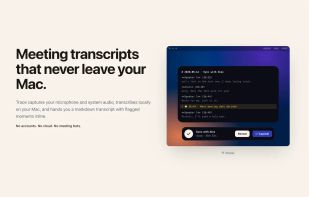
Trace captures your microphone and system audio, transcribes locally on your Mac, and hands you a markdown transcript with flagged moments inline.

Cost / License
- Pay once
- Proprietary
Application type
Platforms
- Mac



Features
Trace: Meeting Transcripts News & Activities
Highlights All activities
Recent activities
 Eduardo Llaguno added Trace: Meeting Transcripts as alternative to iureTranscribe
 SoDulceLabs added Trace: Meeting Transcripts as alternative to Minutiva Private
 Uygar Turantekin added Trace: Meeting Transcripts as alternative to Parrot
 Neural Summary added Trace: Meeting Transcripts as alternative to Neural Summary
 Louis Klinke added Trace: Meeting Transcripts as alternative to Earnote
 Ivan Benitez added Trace: Meeting Transcripts as alternative to SwiftBOL
 Danilo Venom added Trace: Meeting Transcripts as alternative to TypeMyworDz
 Fabio-Falletta added Trace: Meeting Transcripts as alternative to AuroraNote
 T-rker-Tuncer added Trace: Meeting Transcripts as alternative to now recording
 Bart6114 added Trace: Meeting Transcripts as alternative to Loofah


Trace: Meeting Transcripts information
Developed by
 FSCharter Ltd.
 Licensing
Proprietary and Commercial product.Pricing
One time purchase (perpetual license) that costs $10.Alternatives
78 alternatives listedBadge
Get an embeddable badge for Trace: Meeting TranscriptsSupported Languages


No comments or reviews, maybe you want to be first?