Never miss an important task again - powerful reminders made simple, fast, and reliable.
Task Manager is built for people who value clarity and control. Whether you’re managing daily to-dos, recurring responsibilities, or long-term goals, the app gives you structure without complexity.
Unlike basic reminder apps that limit flexibility or rely entirely on cloud services, Task Manager combines intelligent automation with full control over your data.
· Custom Snoozing from the Lock Screen
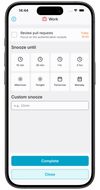
Snooze exactly how you want - even directly from your lock screen. Type "22min", "1h", or any custom time without opening the app. Fast, precise, frictionless.
· Powerful Recurring Reminders
Create advanced repeating rules beyond simple daily or weekly patterns. Build complex schedules that adapt to your real-life routines.
· Offline-First Architecture
Works completely without internet. Your tasks are always accessible and fully functional offline. Cloud sync is optional - not required.
· Real-Time Sync Across Devices
Keep everything aligned instantly. Tasks, edits, and even notification actions (dismiss, snooze, complete) sync seamlessly across your devices.
· Automatic Date & Time Parsing
Simply type naturally - "Meeting Friday at 3pm" - and Task Manager automatically detects and schedules it. No manual setup required.
· Smart Lists That Organize for You
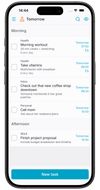
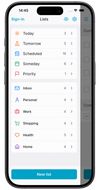
Stay focused with dynamic lists like Today, Tomorrow, Scheduled, Someday, and Priority. Your tasks organize themselves automatically.
· Search, Sorting & Advanced Filtering
Quickly find what matters. Filter by date, priority, or status to maintain total visibility and control.
· Protected Lists with Biometric Security
Secure sensitive tasks using Face ID or Touch ID. Keep personal or confidential lists private.
· Sleek, Smooth Interface
Designed for speed and clarity. Enjoy fluid performance with beautifully crafted light and dark modes.
Task Manager scales from simple daily reminders to advanced productivity workflows - without compromising privacy, speed, or control.







 EU
EU
 Dmitri9 added To Do List - Tasks & Reminders as alternative to Todoist, TickTick, Tasks.org, Microsoft To Do and 5 more


 Fibrebits



No comments or reviews, maybe you want to be first?