TinyTorrent is a free, open-source torrent client for Windows. It shows no ads, installs no bundled offers, and collects no usage data.
It looks and works like Windows: Fluent design, light and dark themes, keyboard shortcuts, and six languages you can switch without a restart. It is a native app, not a web page in a window, so it is light on memory. Close the window to free the memory it used; your downloads keep going from the notification area. Choose Exit, and everything stops.
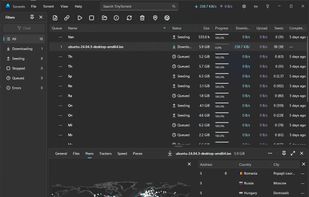
Everything you expect from a torrent client is there: torrent files and magnet links, drag and drop, file selection and priorities, download queues, speed limits with schedules, and seeding limits. A built-in speed test measures your connection and suggests matching limits. When you want detail, open the inspector to see every file, peer, tracker and piece, and watch your peers on a live world map.
When a movie finishes, it waits in your Library with its ratings from IMDb, TMDB, Rotten Tomatoes, Popcornmeter and Metacritic, plus the synopsis and cast. Search by title, genre, year or actor, and filter by resolution or by whether subtitles are there. Your music is there too, by artist, album and track.
Choose OpenSubtitles, SubDL or SubSource once, with no account. From then on, subtitles download on their own when a movie finishes. Each one is saved next to its movie with a matching name, so any player finds it.
Requires Windows 10 (version 1809) or later, 64-bit. Open source under the Mozilla Public License 2.0.







 synapse-sr added TinyTorrent as alternative to qBittorrent, µTorrent, BitTorrent, Transmission and 2 more

 Mario S.


No comments or reviews, maybe you want to be first?