

TidyLeft icon
TidyLeft icon

TidyLeft

 Like

Free, open-source Mac cleaner: uninstall apps completely, remove leftovers from deleted apps, clear developer caches and see what's using disk space.
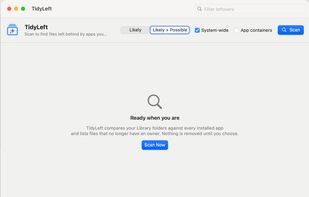
TidyLeft main window before a scan

Cost / License

  • Free
  • Open Source (MIT)

Application type

Since

  • New

Platforms

  • Mac
0likes
0articles
Save

Features

Features

Highlights All activities

TidyLeft News & Activities

Recent activities

TidyLeft information

AlternativeTo Category

OS & Utilities

GitHub repository

  •  0 Stars
  •  0 Forks
  •  0 Open Issues
  •   Updated  
View on GitHub
TidyLeft was added to AlternativeTo by Ayan-Bhattacharya on and this page was last updated .

No comments or reviews, maybe you want to be first?

Official Links

What is TidyLeft?

TidyLeft is a free, open-source Mac cleaner that only touches third-party files; anything belonging to macOS is never listed. Everything you remove goes to the Trash first, so it can be restored.

  • Uninstall Apps: removes an app together with its settings, caches, containers, helpers and background services in one step. The app is quit first, and folders shared with other apps from the same developer are left unticked.
  • Leftovers: finds files left behind by apps you already deleted the normal way (preferences, caches, containers, launch agents and helper tools).
  • Developer Junk: Xcode derived data, device support files and simulator caches, plus Homebrew, npm, Yarn, pnpm, pip, CocoaPods, Gradle, Maven, Cargo, Go, VS Code and JetBrains caches.
  • Disk Usage: a TreeSize-style size browser with size bars and percentages, starting at app caches. Drill into any folder.
  • Broken Settings: finds damaged, empty or wrongly owned app settings files that make apps crash or forget their settings, and resets them.

Native SwiftUI, universal (Apple Silicon and Intel), macOS 14+. No ads, no account, no tracking. Personal project, provided as-is with no warranty.
