
Thumbwise icon
Thumbwise icon

Thumbwise

 1 like

Rearrange your iPhone Home Screen from your Mac. See every page, folder, widget and the Dock side by side, then apply the exact layout over USB.
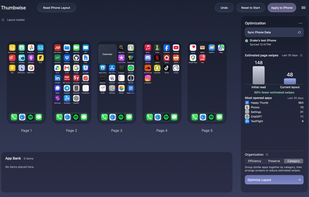
Thumbwise screenshot 1

Cost / License

  • Freemium (Pay once)
  • Proprietary

Since

  • New

Platforms

  • Mac  Requires Apple silicon and macOS 15 or later, an iPhone on iOS 27, and a USB cable.
1like
0articles
Save

Features

Features

Highlights All activities

Thumbwise News & Activities

Recent activities

Thumbwise information

  • Developed by

    Thumbwise
  • Licensing

    Proprietary and Freemium product.
  • Pricing

    One time purchase (perpetual license) that costs $15 + free version with limited functionality.
  • Alternatives

    5 alternatives listed
  • Badge

    Get an embeddable badge for Thumbwise
  • Supported Languages

    • English
Thumbwise was added to AlternativeTo by Drake-Wheeler on and this page was last updated .

No comments or reviews, maybe you want to be first?

What is Thumbwise?

Thumbwise reads your iPhone Home Screen over a USB cable and lets you rearrange apps, folders and widgets on your Mac, then applies the exact layout back to your iPhone.

Unlike Apple Configurator, nothing shuffles when you move an app: everything stays exactly where you put it, including empty spaces between apps. Widgets keep their place and size, and apps you keep only in the App Library stay there instead of being added back to your pages. You preview every change before applying it, and Thumbwise backs up your previous layout so you can restore it without erasing your phone.

Optional extras: a layout optimizer that uses your Screen Time data to cut page swipes, and a local MCP server so AI assistants like Claude can arrange your Home Screen. Everything stays on your Mac: no account, no server. Requires Apple silicon, macOS 15+ and iOS 27.

Thumbwise Videos