





Homepage Panda
Like
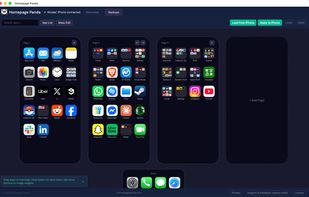
Homepage Panda is a Mac app that turns your iPhone home screen into a real editor. Connect your iPhone with a USB cable, load the layout, and see every page, folder and widget side by side on your Mac. Drag apps between pages with your mouse, search for any app across all pages...

Cost / License
- Pay once
- Proprietary
Application type
Platforms
- Mac


Features
Homepage Panda News & Activities
Highlights All activities
Recent activities
- Superfacto added Homepage Panda
 Superfacto added Homepage Panda as alternative to Apple Configurator 2, iMazing and AnyTrans



Homepage Panda information
Developed by
 Superfacto
 Licensing
Proprietary and Commercial product.Pricing
One time purchase (perpetual license) ranging between $10 and $15.Alternatives
3 alternatives listedBadge
Get an embeddable badge for Homepage PandaSupported Languages

No comments or reviews, maybe you want to be first?