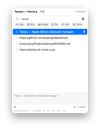
Tameo is a menu-bar clipboard manager for macOS. It remembers what you copy and lets you paste any past item straight into the app you're using — press ??V to open a palette at your cursor, then 1–0 to paste instantly.
What sets it apart:
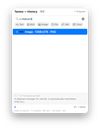
• Search everything, even images. Filter your whole history as you type, with Japanese IME and full/half-width and kana matching. On-device OCR (Apple's Vision framework) even finds — and pastes — the text inside copied images and screenshots. Fully local.
• No third-party SDKs. No servers, accounts, analytics, telemetry, or Firebase. Your clipboard history never leaves your Mac. The source is open (MIT), so anyone can verify it.
• Passwords stay out. Items marked concealed by password managers (org.nspasteboard.ConcealedType) are never saved.
• Privacy-aware monitoring. In the background it checks only what kind of data is on the pasteboard, reading the contents only when you pick an item — so macOS never shows an "app accessed the clipboard" warning.
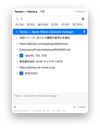
• Handles every type: plain text, rich text (RTF/RTFD), PDF, images, file paths, URLs, and color codes (with swatches). Preview before you paste; hold ? to paste as plain text.
• Snippets, including import from Clipy. Organize reusable text into folders.
• Japanese-friendly: JIS / kana layouts paste correctly (via Sauce), with a Japanese UI.
Tameo is a clean-room take on the classic Clipy — inspired by its behavior, but written from scratch with no code reuse, on a modern Apple-Silicon-native stack (SwiftUI + SwiftData). Distributed with a Developer ID signature, notarized by Apple, and auto-updating via Sparkle.
Requires macOS 14 or later (Apple Silicon or Intel). Free and open source (MIT).









No comments or reviews, maybe you want to be first?