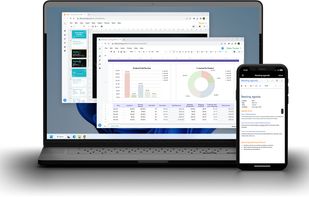
Synology Office represents a paradigm shift in productivity software by moving the entire office suite from public cloud servers directly onto your own hardware, specifically your Synology NAS. As someone managing a homelab and valuing data sovereignty, this solution aligns perfectly with your engineering background by offering a self-hosted ecosystem where you retain 100% control over your data, eliminating reliance on third-party subscription models and recurring license fees. At its core, the suite integrates three primary applications: Synology Doc for word processing, Synology Sheet for spreadsheets, and Synology Slide for presentations, all accessible through a unified, user-friendly web interface that supports universal file formats for seamless import and export.
The platform distinguishes itself through robust security and collaboration features designed for both individual power users and enterprise environments. Every file is protected by certified AES-256 encryption, and the system maintains comprehensive version history, allowing you to track changes and restore previous iterations instantly—a critical feature for production operations where data integrity is paramount. Granular user permissions ensure that access to sensitive documents can be strictly controlled, while real-time co-editing capabilities enable multiple team members to work simultaneously on the same document, complete with user mentions and commenting systems to streamline communication.
A significant advancement in the latest iteration is the integration of generative AI capabilities directly into the workflow. Unlike cloud-dependent AI assistants, Synology's AI tools operate within your private infrastructure, allowing you to draft content, proofread text, translate documents, and analyze spreadsheet data without exposing sensitive information to external servers. The AI assistant can even reference files stored in Synology Drive by using "@" mentions, providing context-aware responses that leverage your local data repository. With features like immersive mode for distraction-free writing, markdown shortcuts, and advanced spreadsheet functions including pivot tables, Synology Office delivers a professional-grade experience that transforms your NAS from a simple storage device into a powerful, secure, and intelligent productivity hub.
To use this app and enjoy its features, you must own Synology NAS and install the latest Synology Drive Server.






 nickpismenkov added Synology Office as alternative to InjOffice
 junghoon-lee added Synology Office as alternative to Thinkfree Office
 Tarcilio Neto added Synology Office as alternative to Google Docs, ONLYOFFICE, CryptPad, Microsoft Word and 10 more


 Synology Inc.

No comments or reviews, maybe you want to be first?