Stuga icon
Stuga icon

Stuga

Keep team documents on your own machine, write together and review AI edits to document text and databases before they apply, by default.
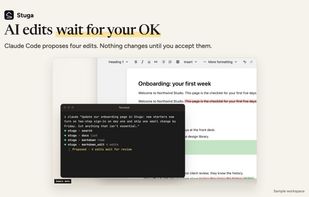
By default, an agent's document-text edit shows up as tracked changes and waits until a person accepts it.

Cost / License

Application type

Platforms

  • Mac
  • Linux
  • Self-Hosted
  • Docker
0likes
0articles
Save

Features

Properties

  1.  AI-Powered

Features

  1.  Ad-free
  2.  No Tracking
  3.  Hierarchical Structure
  4.  Full-Text Search
  5.  Real time collaboration
  6.  Support for MarkDown
  7.  WYSIWYG Support
  8.  Automatic Backup
  9.  Support for @mentions
  10.  Model Context Protocol (MCP) Support
  11.  Knowledge Base
  12.  Team Collaboration
  13.  Wiki

 Tags

Stuga News & Activities

Highlights All activities

Recent activities

Stuga information

AlternativeTo Categories

Office & Productivity, Backup & Sync, Social & Communications, Education & Reference, Remote Work & Education, AI Tools & Services

GitHub repository

  •  1 Stars
  •  0 Forks
  •  0 Open Issues
  •   Updated  
View on GitHub

Popular alternatives

View all
Stuga was added to AlternativeTo by Dream-Dream on and this page was last updated .

No comments or reviews, maybe you want to be first?

Official Links

What is Stuga?

Keep your team's documents on a machine you own instead of someone else's cloud, with a shared place to write, organise work and find the information you need.

Stuga offers real-time editing, comments and databases. Keyword search works across documents without AI setup. With an AI provider configured, Ask answers with sources. By default, edits to document text and databases from Claude Code or Codex wait for a person to accept them. Hosted AI providers receive the content they read.

Run Stuga on an Apple silicon Mac (macOS 13+) or with Docker on a Linux server or NAS. Others use a browser; Stuga is free and open source.